Orders & Invoicing – features worth noting

This map adds a communication judgement for each feature

How features are classified

  • Customer value: High = affects revenue, cash, stock accuracy or daily workload for many users. Medium = valuable in specific situations or segments. Low = convenience.
  • Differentiation: Distinctive = uncommon in comparable SME ERP/invoicing products, or done unusually completely. Strong = present elsewhere but notably well handled here. Standard = expected of any comparable product.
  • Discoverability:
    • Visible: shown in the normal flow.
    • Contextual: appears on the relevant document or state.
    • Configured: needs a module, setting or privilege, so users who have not enabled it will not see it.
    • Automatic: happens without a user action, so it is invisible unless explained.
    • Buried: present but easy to miss (terse or unlabelled control, separate menu, narrow precondition).
  • Communication tier:
    • Lead: headline candidates, grouped into the stories below.
    • Proof point: supports a story or a segment page.
    • Compliance: must-have regulatory capability, communicated as assurance rather than as differentiation.
    • Help & onboarding: worth teaching users, low marketing value.
    • Baseline: expected; list in the catalogue but do not lead with it.

These are product judgements made from the validated semantics, not market research. Differentiation in particular should be checked against current competitor offerings before external use.

Lead stories

Order fulfilment you can see

Orders that can be fulfilled in stages, combined into one document, and tracked line by line through to the documents that fulfilled them.

  • Lead features: Partial Order fulfilment; Order progress; Multiple Orders in one document; Resulting documents.
  • Proof points: Quotation, Proforma or Estimate to Order; Order to Invoice; Order to Delivery; Pending customer-order quantity.
  • Discoverability: these are not easy to find, so communication has to carry them:
    • Pending customer-order quantity (automatic)
  • Caveat — Multiple Orders in one document: Never advertise mixing Orders and Consignments in one selection.

Consignment stock, end to end

Goods placed with customers stay on the books as consigned stock until each unit is invoiced or returned, with the split always visible.

  • Lead features: Customer Consignment; Consignment invoicing; Consignment return; Consignment progress; Consignment invoiced/returned split; Multiple Consignments in one Invoice.
  • Discoverability: these are not easy to find, so communication has to carry them:
    • Customer Consignment (configured)
  • Caveat — Multiple Consignments in one Invoice: Never advertise mixing Orders and Consignments in one selection.

Invoice from the work already done

Invoices built from earlier documents instead of retyping them, without duplicate stock movements or double counting.

  • Lead features: Invoice several Quotations, Proformas or Estimates.
  • Proof points: Invoice a Delivery or Bill of Works; Invoice several Deliveries or Bills of Works; Create from a source document.
  • Discoverability: these are not easy to find, so communication has to carry them:
    • Invoice several Quotations, Proformas or Estimates (buried)
    • Invoice several Deliveries or Bills of Works (buried)
  • Caveat — Invoice several Quotations, Proformas or Estimates: Do not imply Consignments can be added through Document; invoicing an Order-derived Proforma does not fulfil the Order.

Buy for what customers ordered

Purchase suggestions calculated from outstanding customer demand, stock and pending supply.

  • Lead features: Purchase replenishment from customer demand.
  • Proof points: Pending customer-order quantity.
  • Discoverability: these are not easy to find, so communication has to carry them:
    • Pending customer-order quantity (automatic)

Billing on autopilot

One-to-one, per-customer and recurring contract billing in bulk, through the same validation and posting as manual invoices.

  • Lead features: Automated billing by document; Automated billing by customer; Recurring contract invoicing.
  • Proof points: Batch print, email and PDF.
  • Discoverability: these are not easy to find, so communication has to carry them:
    • Automated billing by document (configured)
    • Automated billing by customer (configured)
    • Recurring contract invoicing (configured)
    • Batch print, email and PDF (buried)

E-invoicing ready

Invoices sent over Peppol, with the national electronic formats covered.

  • Lead features: Peppol e-invoicing.
  • Proof points: UBL and CIUS-PT electronic invoice; JEDI, eSPap and SAF interchange.
  • Discoverability: these are not easy to find, so communication has to carry them:
    • Peppol e-invoicing (configured)
    • JEDI, eSPap and SAF interchange (configured)
  • Caveat — Peppol e-invoicing: Network delivery is external; describe sending and status, not guaranteed delivery.
  • Caveat — JEDI, eSPap and SAF interchange: Local sending/export; external protocol lifecycles are not audited.

High value, low discoverability

These are the strongest candidates for in-product help, onboarding and release notes, because users get significant value from them but are unlikely to find them unaided. Compliance and baseline features are excluded.

FeatureDiscoverabilityWhy it is missed
Credit limit and overdue blockingConfiguredOnly acts once limits are configured on the customer.
Customer ConsignmentConfiguredNeeds consignment enabled and a consignment series.
Invoice several Quotations, Proformas or EstimatesBuriedSits behind the compact Document button, which does not explain that item lines are copied.
Invoice several Deliveries or Bills of WorksBuriedSame Document button; nothing indicates that several documents can be combined.
Receipts for several documentsBuriedUses Document inside a new Receipt, which is not an obvious place to look.
Multibanco payment referencesConfiguredRequires provider and series configuration.
Customer price lists and discountsConfiguredNeeds multiple price lists or a discount grid to be enabled.
Automated billing by documentConfiguredSeparate Automated Billing menu, only with automation enabled.
Automated billing by customerConfiguredSeparate Automated Billing menu, only with automation enabled.
Recurring contract invoicingConfiguredSeparate contracts area, only with contracts enabled.
Peppol e-invoicingConfiguredRequires Peppol configuration and customer identifiers.

Full classification

FeatureValueDifferentiationDiscoverabilityTier
Orders and Invoicing work areasMediumStandardVisibleBaseline
Document search and browsingMediumStandardVisibleBaseline
DraftsMediumStandardVisibleHelp & onboarding
Document series configurationMediumStandardConfiguredBaseline
Reusable document commentsLowStandardContextualHelp & onboarding
Document data importMediumStrongConfiguredProof point
Sales, receipts and tax listingsMediumStandardVisibleBaseline
Listing print and CSV exportMediumStandardVisibleBaseline
Document composition and issueHighStandardVisibleBaseline
Article, service and text linesHighStandardVisibleBaseline
Customer, contact and addressesMediumStandardVisibleBaseline
Salesperson and operator attributionMediumStandardConfiguredHelp & onboarding
Project and resource associationMediumStrongConfiguredProof point
Customer–supplier order linkMediumStrongBuriedHelp & onboarding
Foreign-currency documentsMediumStandardConfiguredHelp & onboarding
Customer referenceLowStandardVisibleBaseline
Create from a source documentHighStandardContextualHelp & onboarding
Copy documentMediumStandardBuriedHelp & onboarding
Kits/packages in documentsMediumStrongConfiguredProof point
Dimension-based quantities (A×B)MediumDistinctiveConfiguredProof point
Option-combination surchargesMediumDistinctiveConfiguredProof point
Line sortingLowStandardBuriedHelp & onboarding
Credit limit and overdue blockingHighStrongConfiguredProof point
Edit, delete and void protectionMediumStandardContextualCompliance
Salesperson approval limitsMediumStrongConfiguredHelp & onboarding
Flexible order controlMediumStrongConfiguredHelp & onboarding
Quotation, Proforma or Estimate to OrderHighStandardContextualProof point
Order to InvoiceHighStandardContextualProof point
Order to DeliveryHighStandardContextualProof point
Partial Order fulfilmentHighStrongContextualLead
Order progressHighDistinctiveVisibleLead
Multiple Orders in one documentHighDistinctiveContextualLead
Pending customer-order quantityMediumStrongAutomaticProof point
Manual close and reopenMediumStandardContextualHelp & onboarding
Purchase replenishment from customer demandHighDistinctiveContextualLead
Customer ConsignmentHighDistinctiveConfiguredLead
Consignment invoicingHighDistinctiveContextualLead
Consignment returnHighStrongContextualLead
Consignment progressHighDistinctiveVisibleLead
Consignment invoiced/returned splitHighDistinctiveVisibleLead
Multiple Consignments in one InvoiceHighDistinctiveContextualLead
Resulting documentsHighDistinctiveVisibleLead
Document status check and repairMediumStrongContextualHelp & onboarding
Invoice, Invoice/Receipt and Cash SaleHighStandardVisibleBaseline
Invoice a Delivery or Bill of WorksHighStrongContextualProof point
Invoice several Quotations, Proformas or EstimatesHighDistinctiveBuriedLead
Invoice several Deliveries or Bills of WorksHighStrongBuriedProof point
Returns and credit returnsHighStandardContextualBaseline
Credit and debit notesHighStrongContextualProof point
Void, delete draft and void-and-replaceMediumStandardContextualBaseline
Partial paymentsHighStandardContextualProof point
Receipts for several documentsHighStrongBuriedProof point
Cash advances and payment returnsMediumStrongConfiguredProof point
Payment method, tendered amount and changeMediumStandardVisibleBaseline
Multibanco payment referencesHighStrongConfiguredProof point
Cashier shiftsMediumStandardConfiguredHelp & onboarding
Budget headingsMediumDistinctiveConfiguredProof point
Customer price lists and discountsHighStrongConfiguredProof point
Line discounts and global discountHighStandardVisibleBaseline
Cost and margin visibilityMediumStrongConfiguredProof point
VAT-inclusive or exclusive pricingHighStandardAutomaticCompliance
VAT exemption, customer tax data and OSSHighStandardAutomaticCompliance
Eco tax, stamp duty and withholdingMediumStrongConfiguredCompliance
Freight chargesMediumStandardVisibleBaseline
Second-hand goods and works of art margin schemeMediumDistinctiveConfiguredProof point
Fiscal signature and numbering controlHighStandardAutomaticCompliance
Tax-authority series codes (ATCUD)HighStandardConfiguredCompliance
Warehouses and stock availabilityHighStandardConfiguredBaseline
Serial numbers and lotsHighStandardConfiguredBaseline
Barcode labels from documentsMediumStandardConfiguredHelp & onboarding
Invoice now, deliver laterMediumStrongConfiguredProof point
Pick and transit documentsMediumStandardContextualHelp & onboarding
Courier and carrier shipmentsMediumStrongConfiguredProof point
Transport document communication (Portugal)HighStandardConfiguredCompliance
Automated billing by documentHighStrongConfiguredLead
Automated billing by customerHighStrongConfiguredLead
Batch receiptsMediumStrongConfiguredHelp & onboarding
Batch print, email and PDFMediumStandardBuriedProof point
Recurring contract invoicingHighDistinctiveConfiguredLead
Print and PDFHighStandardVisibleBaseline
Gift receipt printLowStandardConfiguredHelp & onboarding
Email documentsHighStandardContextualBaseline
UBL and CIUS-PT electronic invoiceHighStandardContextualCompliance
Peppol e-invoicingHighStrongConfiguredLead
JEDI, eSPap and SAF interchangeMediumStrongConfiguredCompliance
Webshop ordersMediumStrongConfiguredProof point
Repairs and RMAMediumStrongConfiguredProof point
Production documentsMediumStrongConfiguredProof point
Trade-insMediumDistinctiveConfiguredProof point

Rounding, VAT and Peppol

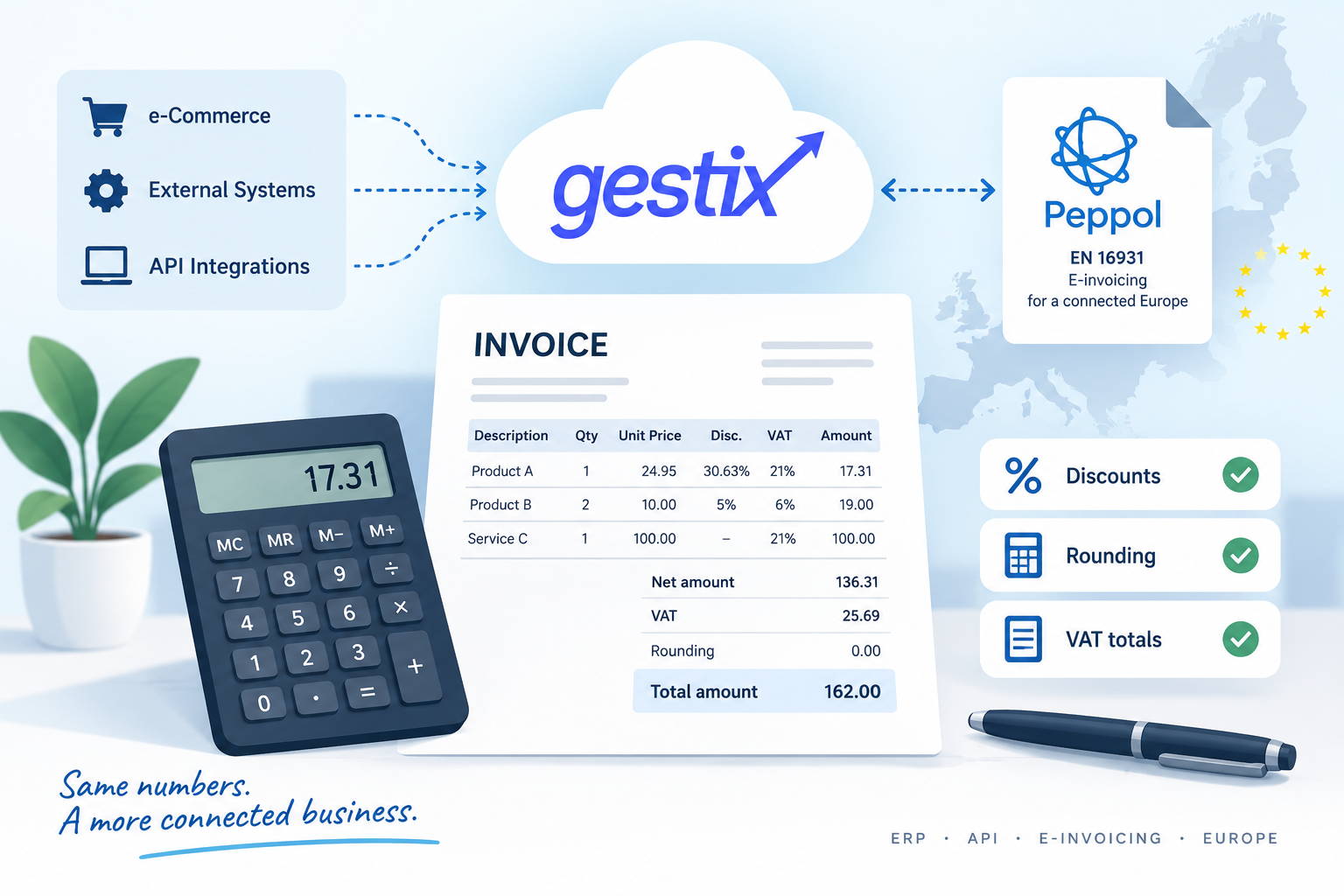
Rounding, VAT and Peppol: why one cent can make a difference

An invoice shows one total in an ERP system, while an e-commerce platform or accounting application arrives at a figure that differs by one cent. Which system is wrong?

In many cases, neither.

A one-cent difference may simply result from the point at which each system rounds prices, discounts, taxable amounts and VAT. With the increasing adoption of structured electronic invoicing — particularly through Peppol and models based on the European EN 16931 standard — these small differences are no longer merely a matter of presentation: they can determine whether or not a document is accepted by another system.

This is why Gestix totalises invoices within the ERP itself rather than delegating the calculation to the application communicating with the API.

An invoice is more than quantity × price + VAT

The calculation may appear simple:

Quantity × Price − Discounts + VAT = Total

In practice, several decisions have to be made along the way.

Does the price include VAT? Are there multiple successive discounts on the line? Is there an overall document discount? Is that discount a percentage or an amount? At what point should rounding take place? Is VAT calculated line by line or on accumulated amounts?

Two applications can use exactly the same prices, quantities, discounts and VAT rates and still arrive at slightly different totals.

A particularly interesting case occurs when prices already include VAT.

An example: €24.95 with a 30.63% discount

Consider one unit with:

  • VAT-inclusive price: €24.95
  • discount: 30.63%
  • VAT: 21%

After applying the discount, the gross line amount is:

24.95 × 0.6937 = €17.307815

Rounded to cents:

€17.31

To determine the corresponding taxable amount:

(24.95 × 0.6937) ÷ 1.21 = €14.303979…

Rounded to cents:

€14.30

The VAT amount for the line is then determined by the difference:

€17.31 − €14.30 = €3.01

It may seem like an insignificant detail. It is not.

If another application first rounds the gross amount and then recalculates VAT from that already-rounded figure, it may, in certain cases, arrive at a different result.

Multiply that difference across several invoice lines, different VAT rates, discounts and allowances, and it becomes easy to understand why two systems can disagree on the totals of the same invoice.

EN 16931 and the importance of line-level calculation

Structured electronic invoicing has made this issue particularly relevant.

The European EN 16931 standard, used throughout the European e-invoicing ecosystem and in Peppol implementations, defines a rigorous semantic model for the values that make up an invoice.

It is not enough for the final total simply to “look right”. Line amounts, taxable amounts, taxes, discounts and totals must be consistent with one another and comply with the validation rules applicable to the electronic document.

Gestix therefore uses a calculation model that transforms the document’s commercial data — including VAT-inclusive prices, discounts and allowances — into the net amounts, taxable amounts, taxes and totals required by the EN 16931 model and Peppol interoperability rules.

Under this model, each line is totalised individually, and the resulting rounded values are subsequently used to build the VAT subtotals and document totals.

This reduces one of the classic causes of one-cent discrepancies: using rounding strategies that differ from those required to maintain consistency between line amounts, taxable amounts, VAT subtotals and the totals required by the interoperability model.

Three line discounts are not a single discount

There is another frequent source of discrepancies in integrations.

Gestix can apply multiple successive discounts to an invoice line. These discounts are cumulative rather than additive.

For example, a 10% discount followed by a 5% discount does not amount to a 15% discount.

The calculation is:

0.90 × 0.95 = 0.855

The effective discount is therefore 14.5%.

This distinction is particularly important for integrations with online stores, commercial platforms and external applications that create documents through the Gestix API.

If the external system simply adds the percentages together, its calculated values will no longer match those of Gestix.

What about document-level discounts?

Discounts applied to the document as a whole add another dimension to the problem.

An overall discount may affect different taxable amounts when the document contains lines subject to different VAT rates. It is therefore necessary to determine correctly the portion of the discount associated with each VAT category and rate.

Under the EN 16931/Peppol model, document-level discounts are identified as such and taken into account when determining the taxable amount for the corresponding VAT category.

Internally, Gestix performs the calculations and adjustments necessary to preserve consistency between the document’s commercial values, taxable amounts, VAT subtotals and final total.

Where necessary, residual differences caused by rounding must also be handled in a controlled manner rather than simply disappearing or altering the intended document total.

The API provides the commercial data; Gestix calculates the totals

This leads to an important rule for applications integrating with Gestix.

An application creating an invoice through the API should primarily provide the commercial data from which the document is built: quantities, prices, discounts, VAT rates and any other applicable elements.

Invoice totalisation takes place on the Gestix server.

Once the document has been processed, the API returns the values actually calculated and persisted by the ERP, including the net amount, VAT, rounding and total.

This provides a single source of truth for the Gestix document.

The external application may, of course, perform its own calculations for display or verification purposes. It should not, however, assume that a calculation using a different rounding strategy will necessarily produce the same intermediate values.

ERP, API and Peppol speaking the same language

Interoperability is not merely about being able to transmit an XML file from one system to another.

Both systems must attribute the same meaning to the values contained in that file.

This is precisely why apparently minor questions such as when to round a cent matter in the evolution of Gestix.

Support for electronic invoicing and Peppol does not end with generating the electronic document. It starts earlier, with the calculation model that produces the values that will ultimately form part of that document.

By centralising invoice totalisation within the ERP and applying rules appropriate to different invoicing scenarios, Gestix aims to ensure that what is invoiced, what the API returns and what is transmitted electronically all represent the same commercial document.

Because in electronic invoicing, one cent is information too.

Gestix ERP 2026: Peppol, Trade-Ins, API and Functional Improvements

Throughout 2026, Gestix ERP continued to receive functional and technical improvements aimed at strengthening platform stability, addressing new legal and operational requirements, and simplifying the everyday tasks performed by businesses.

Among the most significant developments was the launch, last April, of the Gestix ERP integration with the Peppol network. This represented an important milestone in the platform’s evolution towards faster, more secure and interoperable electronic invoicing.

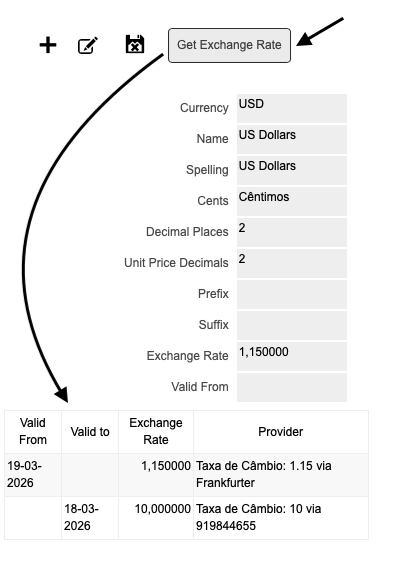
Users can now also retrieve exchange and conversion rates directly from the Currencies menu, allowing exchange rate information to be updated in a simpler and more centralised way.

Exchange Rate Updates via Web Service

In addition to these new features, several functional improvements were made to existing areas of the application.

When issuing invoices and sales orders, users can now view the gross profit margin, providing better visibility into the profitability of documents while they are being prepared.

Gross Profit Analysis on Invoices

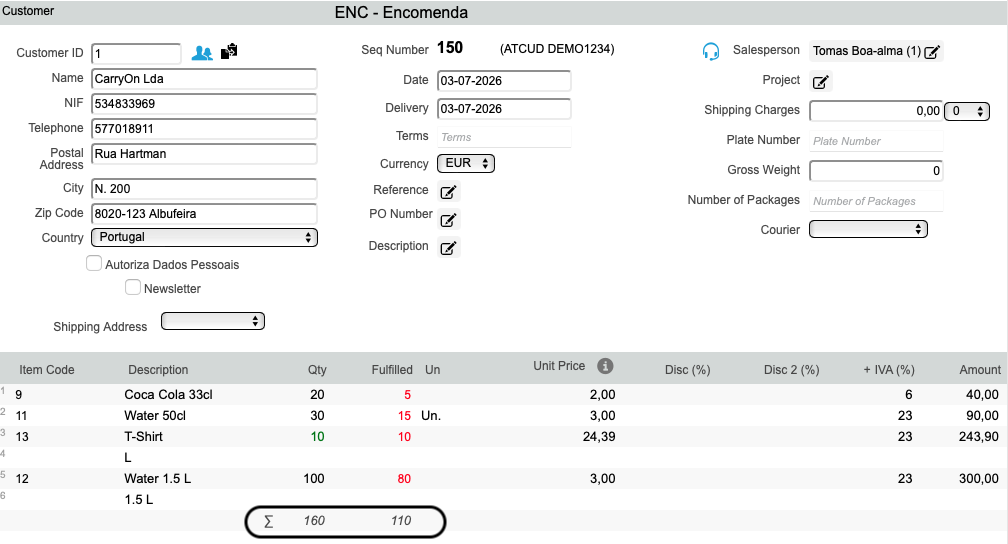
A total units calculation was also added to sales orders and invoices, making it easier to obtain an overall view of each document and monitor the quantities entered.

Information on Invoiced, Ordered and Fulfilled Units

When creating a customer directly from an invoice, it is now possible to assign attributes to the new customer, ensuring a more complete customer record from the moment it is created.

Another important improvement is the ability to retrieve customer information using the VAT identification number for European entities. This helps speed up data entry and reduces the need for information to be entered manually.

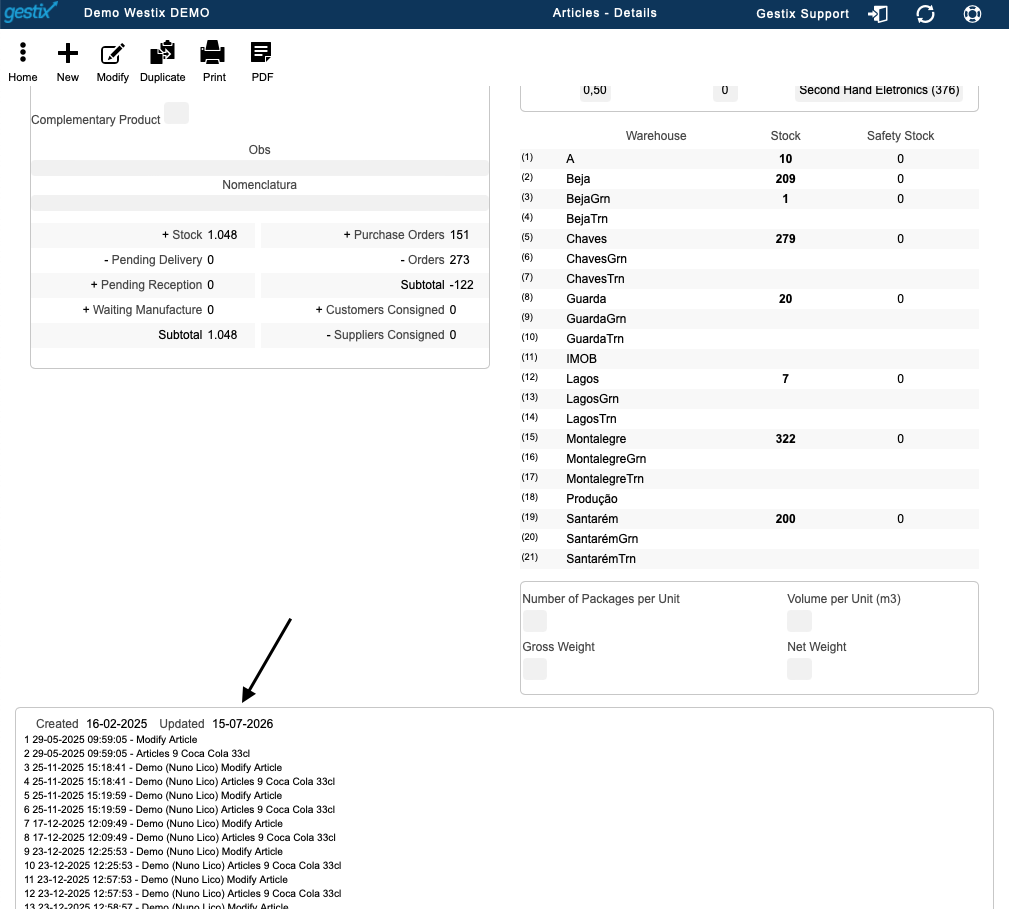
An edit and update history has also been introduced in the item record, improving the traceability of any changes made.

Change History in the Item Record

For businesses that regularly invoice the same service, such as taxi operators, Uber drivers and similar service providers, Gestix now supports the automatic entry of a predefined service when issuing an invoice, simplifying the invoicing process.

In terms of integration with external systems, the Gestix API now supports multiple simultaneous transactions, improving responsiveness in high-volume or continuous integration scenarios.

It is also now possible to increase the maximum length of item and service descriptions to 60 characters through the Parameters menu. For further information about this configuration, please contact Gestix Technical Support.

These improvements form part of the ongoing development of Gestix ERP, with the aim of responding to users’ needs, improving existing processes and preparing the platform for new digital integration and communication requirements.

Gestix ERP/CRM Software

Gestix ERP/CRM Software
Developed by Westix-TI, Gestix is a pioneering cloud-based business management solution. It was the first of its kind to be sold in Portugal and is now certified across several countries and regions.

About Westix-TI

Founded in 2004 by two experienced enterprise software engineers, Westix-TI builds on the legacy of GIPS – Gestão Informática e Personalização de Sistemas, which developed the first version of Gestix for Unix platforms. Key clients have included Regra S.A., Compta S.A., and The Portuguese Government.

Why Choose Gestix?

  • Performance: Gestix uses C++ for optimal speed and resource efficiency, with versions available for Windows, MacOS, and Linux.
  • Scalability: Capable of managing hundreds of stores, it supports centralized inventory management, with a single SAF-T file for all branches.
  • Global Reach: Multilingual and certified for compliance in various regions.

Testimonials

  • “Gestix was the only software that allowed us real-time visibility of store sales.”
    – Bruno Borges, iServices
  • “Billing seemed complicated, but thanks to their support, it’s easy.”
    – Miguel Guilherme, Actor
  • “Gestix is my go-to for customer management.”
    – Beatriz Martins, Remax Prisma
  • “We adopted Gestix for its cloud availability before others.”
    – Francisco Fernandes, Proxidados
  • “It’s the best warehouse management software I know.”
    – Alessandro Gazzola, Alimentari-GT

Flexible Deployment Options

  1. On Premises: Install and maintain Gestix on your own hardware.
  2. Private Cloud Server: We manage Gestix on your exclusive cloud server.
  3. Software as a Service (SaaS): Enjoy fully managed, cloud-hosted access from any device.

Pricing

Starting from EUR 100 annually per user.


Gestix in the Sale and Repair of Mobile Phones, Smartwatches and Tablets

Usually four types of situations happen when managing the sale and repair of technological devices:

  • Sale of new devices with warranty provided that is controlled by serial number (or IMEI)
  • Return of devices for refurbishment and resale as pre-owned (these items require as well individual control for warranty purposes)
  • Sale of refurbished devices the general public under the Used VAT Regulations
  • Device repair with our without warranty

With Gestix you can control and manage your stock, buy and sell devices using serial numbers or IMEI.

Sell used and/ or refurbished devices such as Smart Phones, Smart Watches and others. Follow the steps below.

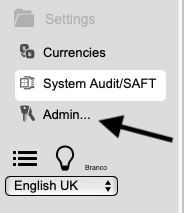
Select Admin
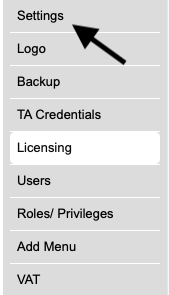
Select Settings

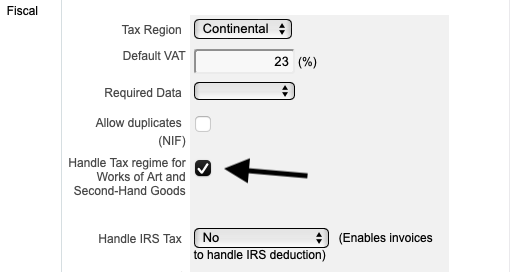
Select the option Handle Tax regime for Works of Art and Second-Hand Goods

After setting up your profile, your business is now able to buy new or used items, in small or big quantities, sell new or refurbished items with or with out serial number and even offer a repair service.

It is a very simple process to buying an item that is controlled by a serial number IMEI, to later sell:

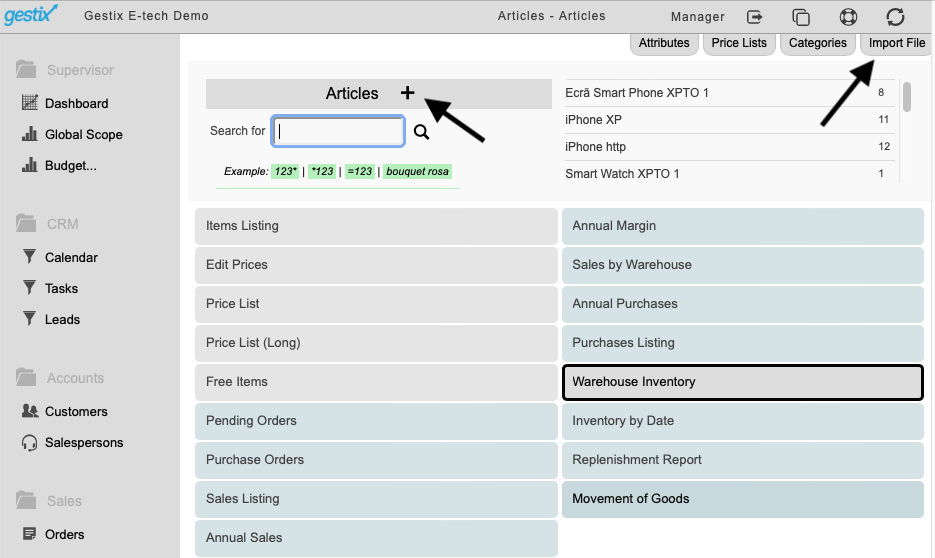
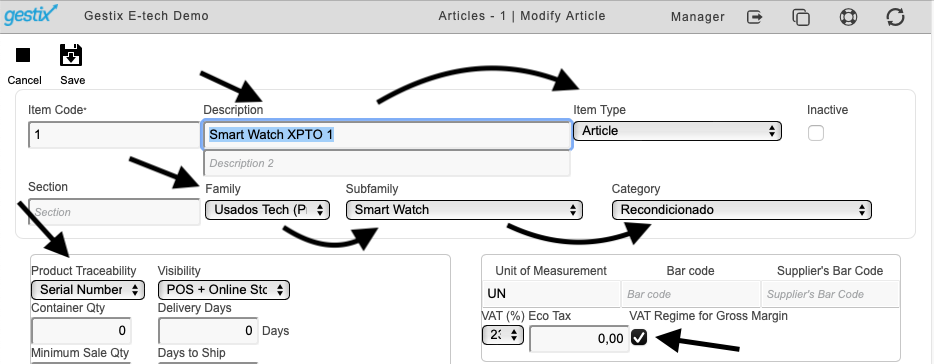
1st – Create a item, or you can import a list of pre-existent item in a CSV file, and make the necessary changes, as showed in the image below,

2nd – if the items you are creating are new, do not select the option “VAT Regime for Gross Margin” this option should only be used for used items.

Your items are now setup,

Let’s see how to buy a used item and sell it as a refurbished item.

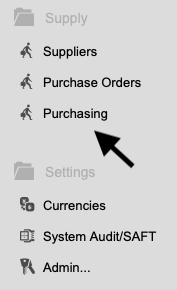
Select Purchasing from the Supply menu

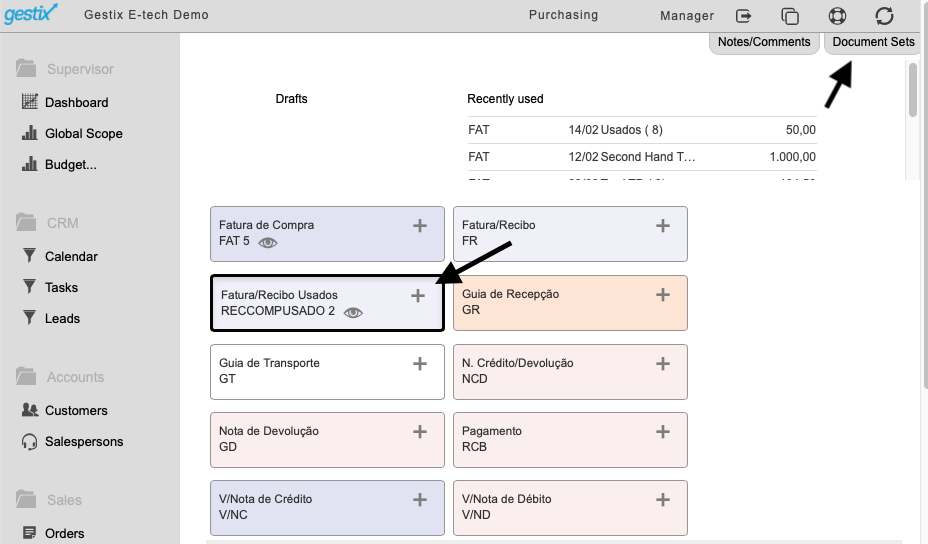
In the menu Purchasing you can create as many new set of document as you need, or you can use the preset documents already in the data base.

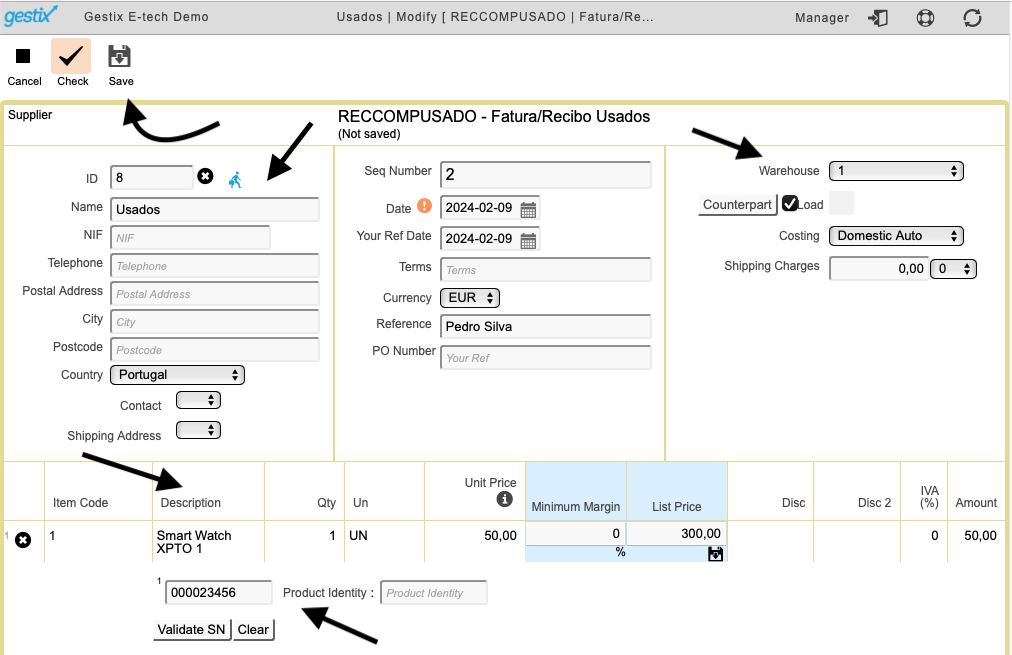
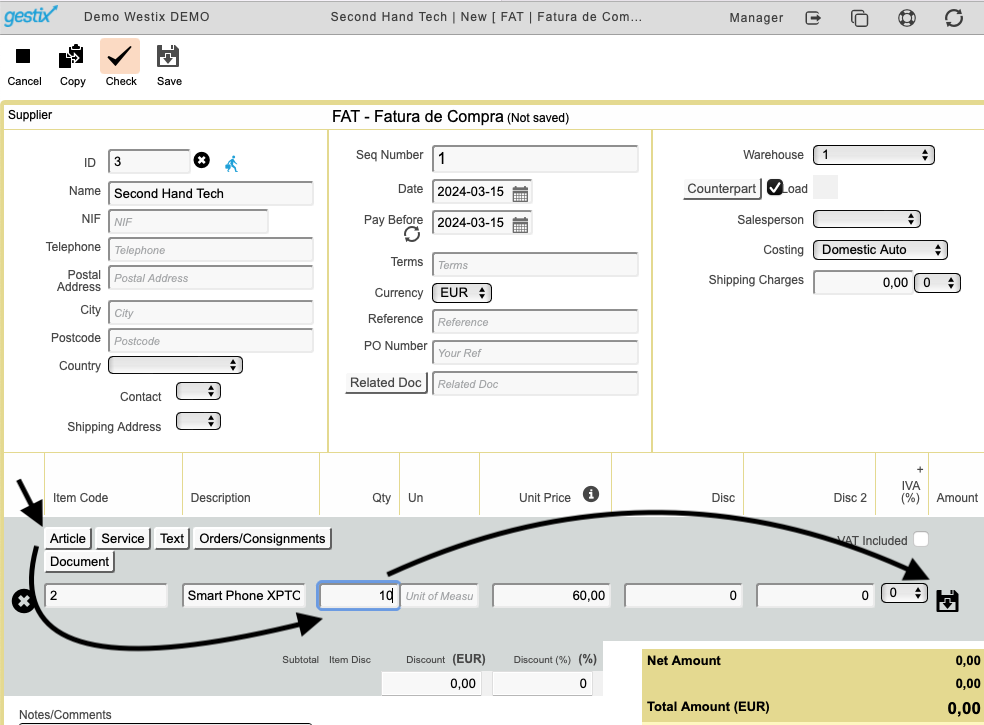
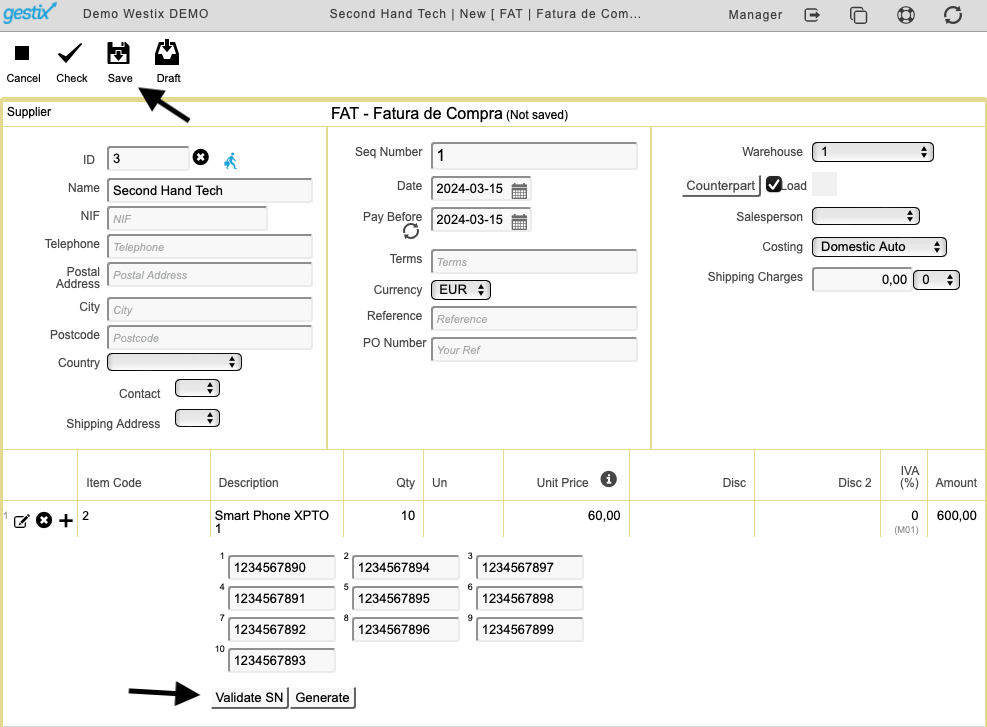
Use the + sign to create a new Invoice/receipt, fill in the necessary information, bearing in mind that you will need the serial number or IMEI of the item you are buying , at the end click save.

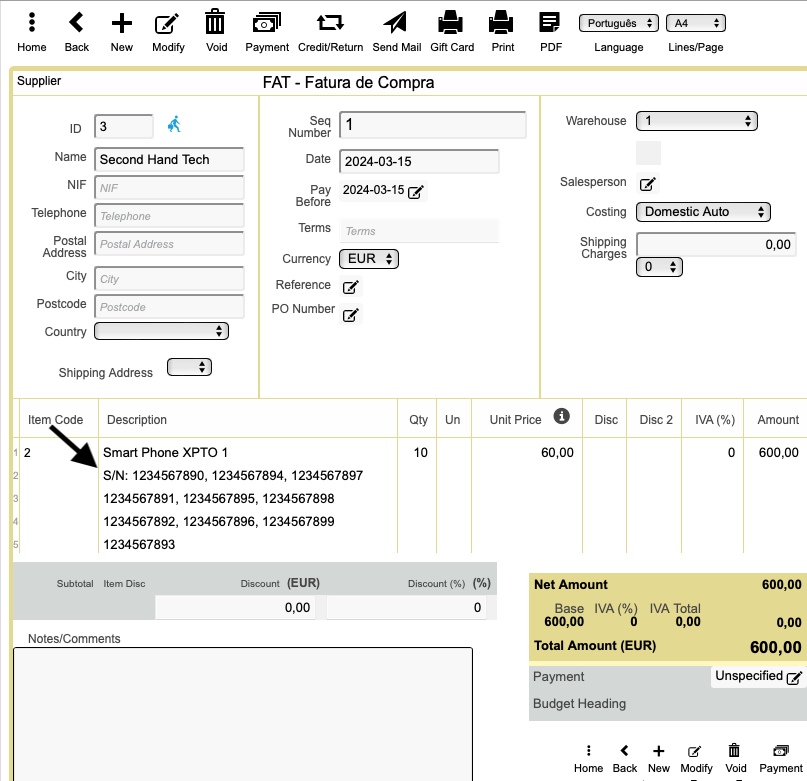
For your and the seller’s control, the serial number is recorded on the document.

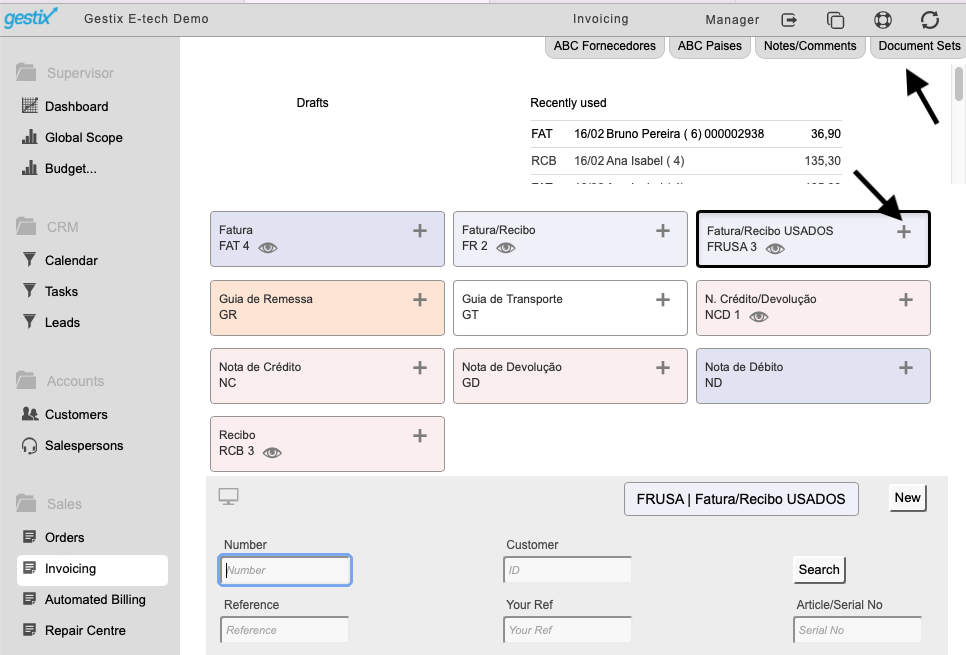
To sell these items, as in the previous step, we created a new Document Set within the invoice menu, you can create one or as many as you need or you can use the predefined ones.

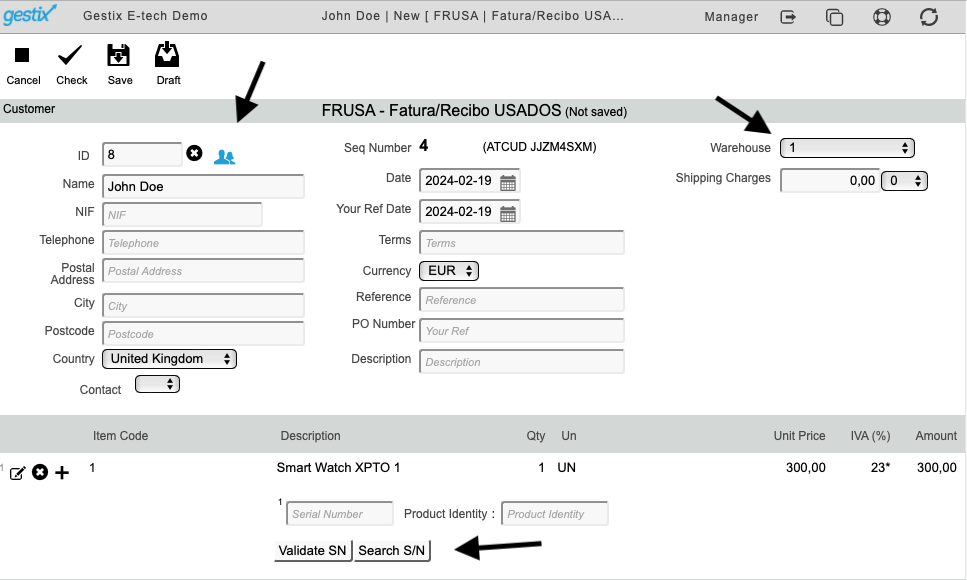
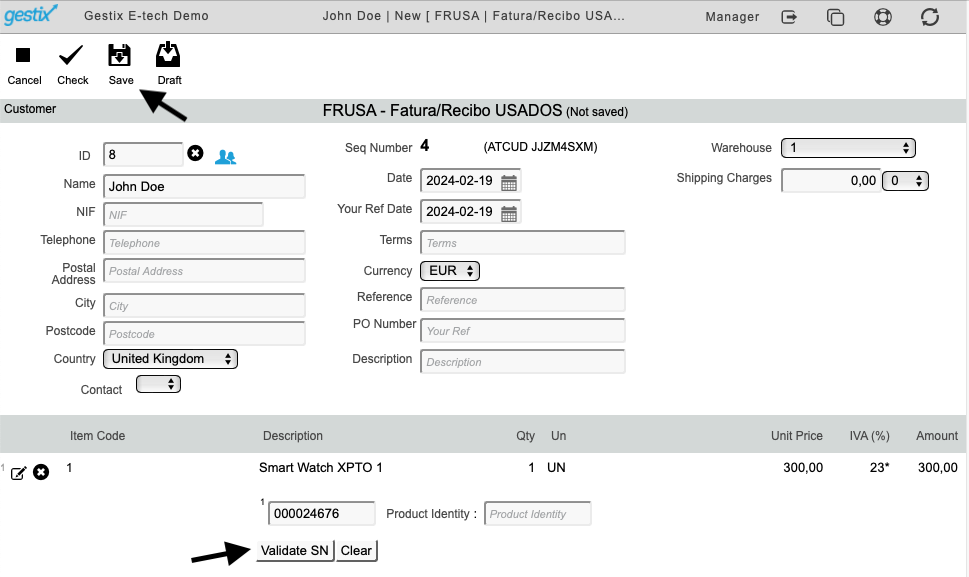
To create a new Invoice/Receipt (as in the exemple below), click on the + sign, fill in all of the necessary information, please be aware that the Serial Number or IMEI for the item you are selling is required,

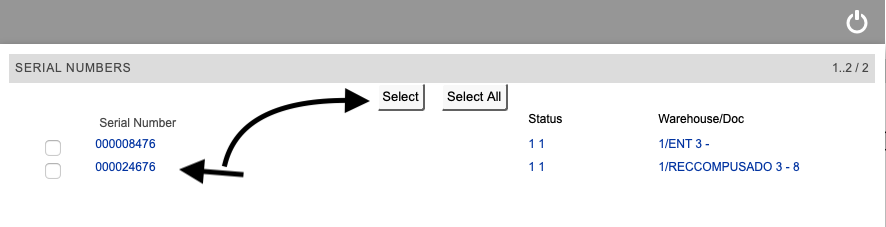
You can either enter the Serial Number manually or use the search button, where all of the available serial numbers associated with the item you are selling will be listed, you just have to select the correct one.

Validate the Serial Number and save the document.

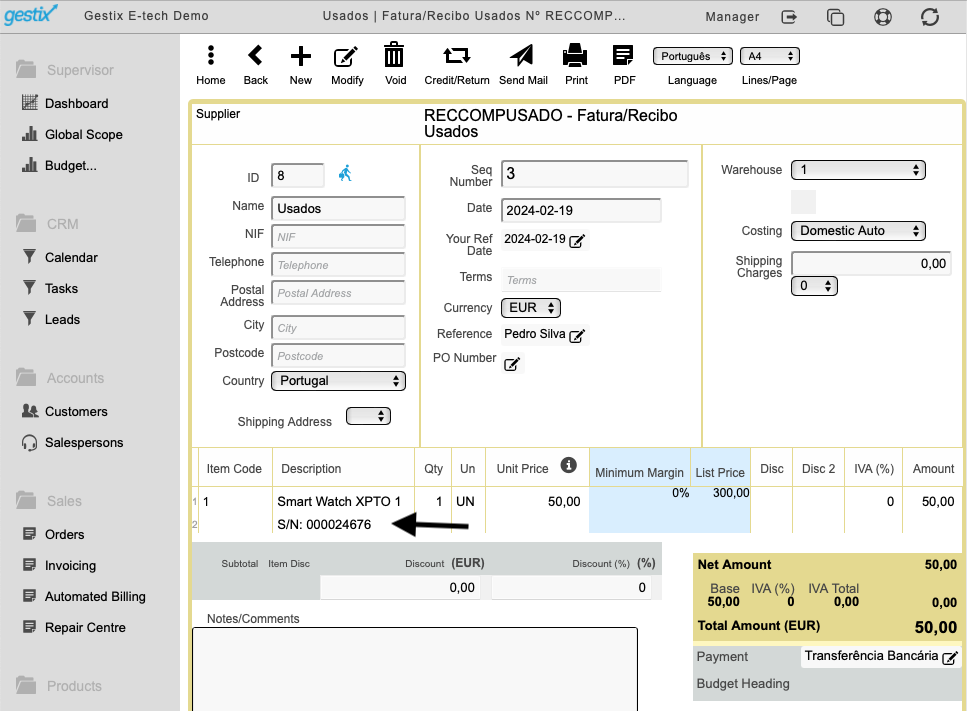
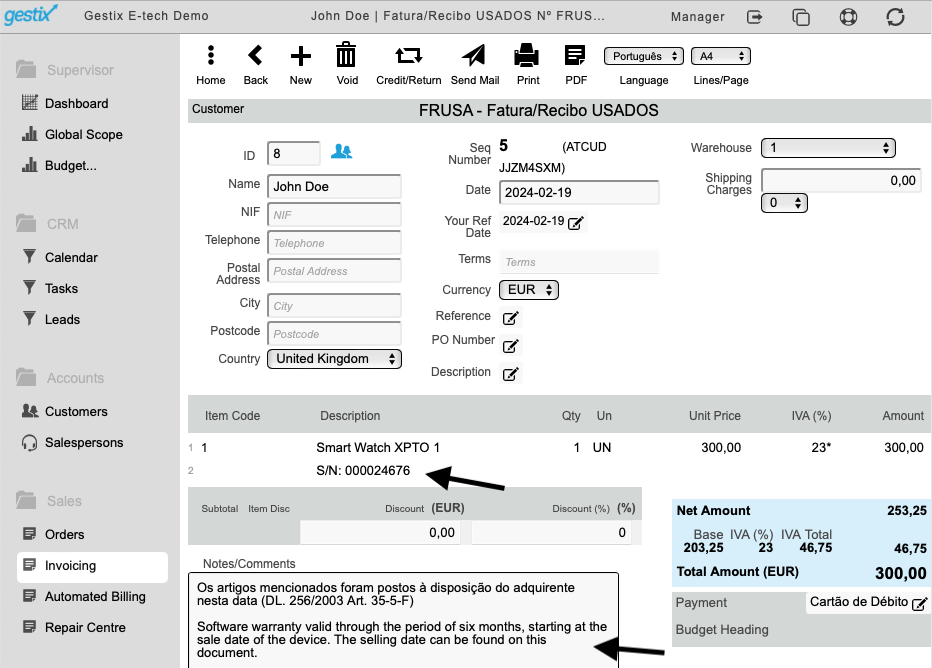
The Invoice/Receipt is now created (for your control, the serial number is included within the document), if the item is being sold with warranty, you can add the details in the “Notes/Comments” area.

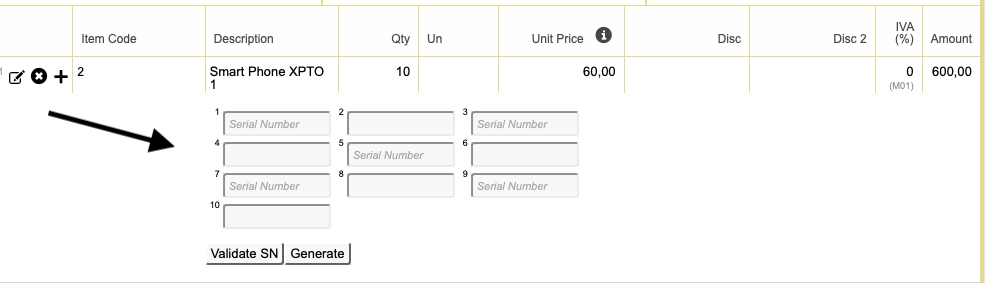
PURCHASE OF ITMES IN LARGE QUANTITIES

The process for buying large quantities of items is very easy and a quick process, you should proceed as per above, you just need to enter all of the Serial Numbers for the items you are receiving, as shown in the following images:

CHECK THE SERIAL NUMBERS OR IMEI OF AN ITEM THAT ARE AVAILABLE ON THE SYSTEM

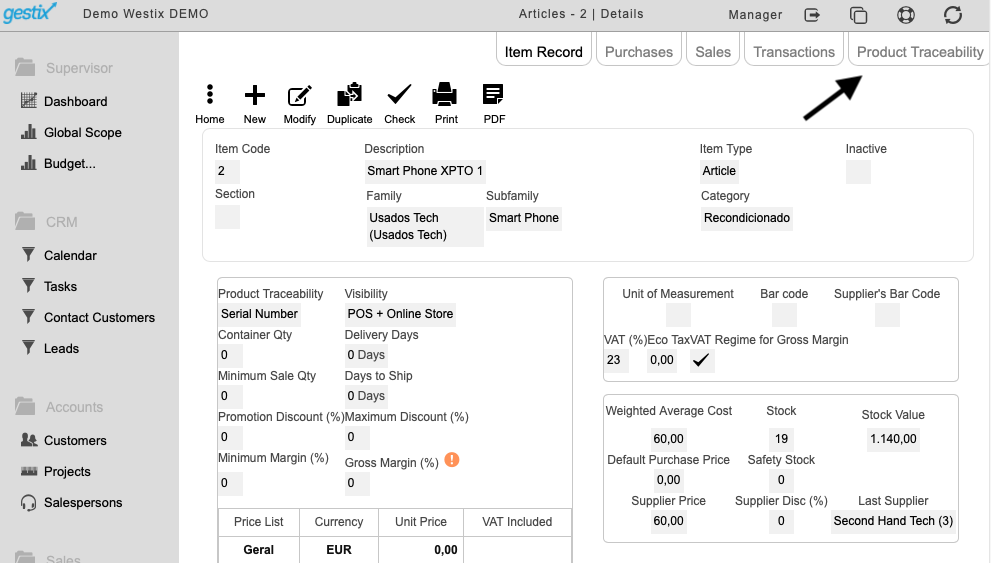
In the Products menu, select the option Articles, select the wanted item and click on Product Traceability option

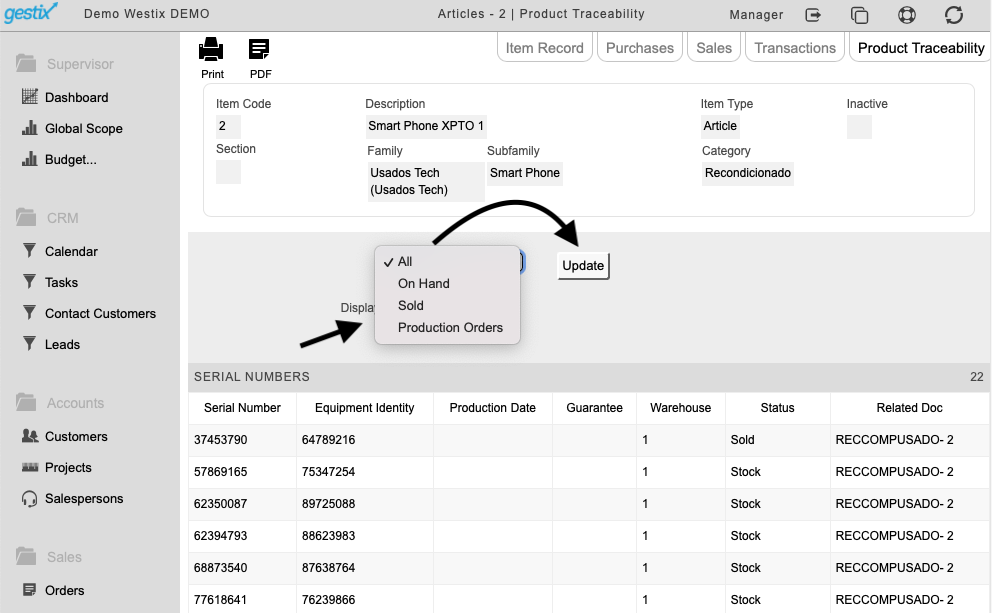
All of the Serial Numbers that have ever been processed within Gestix will be listed as shown in the image below, you can customize your search, by sold, on hand or production orders as per image below:

EQUIPMENT REPAIR

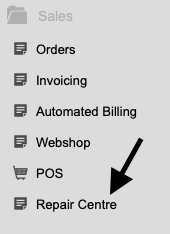
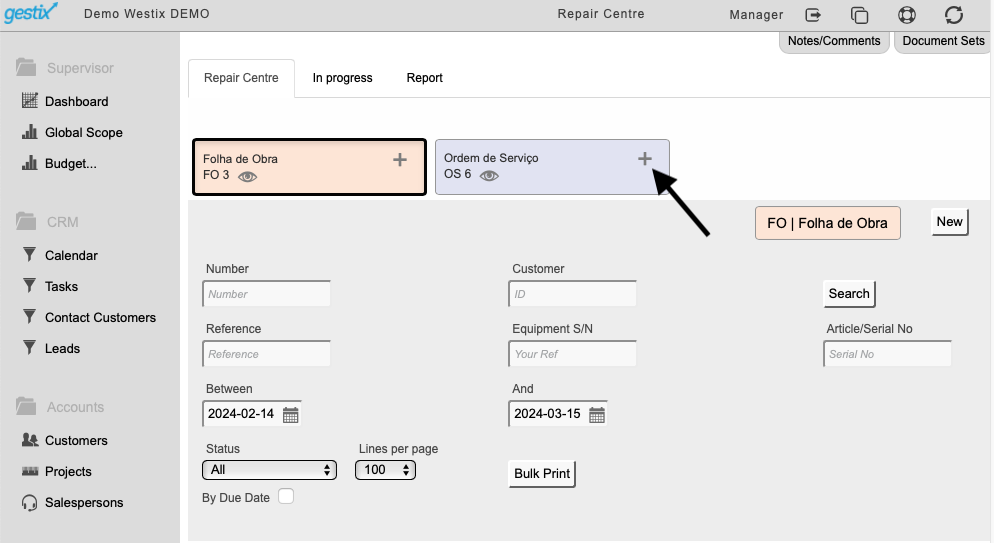
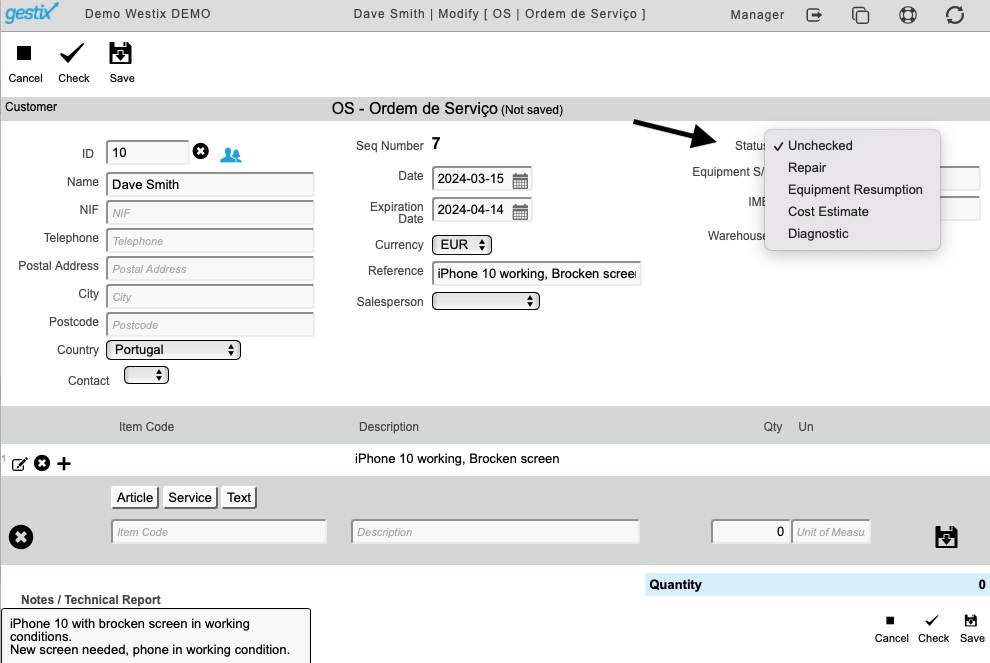
In the Sales menu, select the option Repair centre

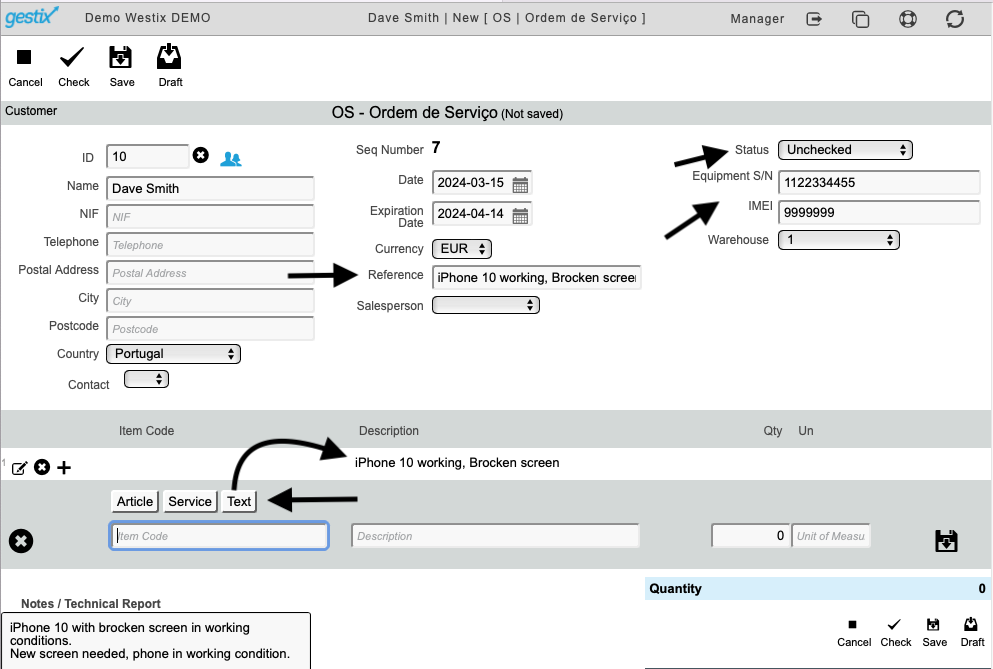
The first step will have to be to create a service order to record the details of the repair and the item to be repaired (including the Serial Number).

When creating the Service Order, in the status area select Unchecked

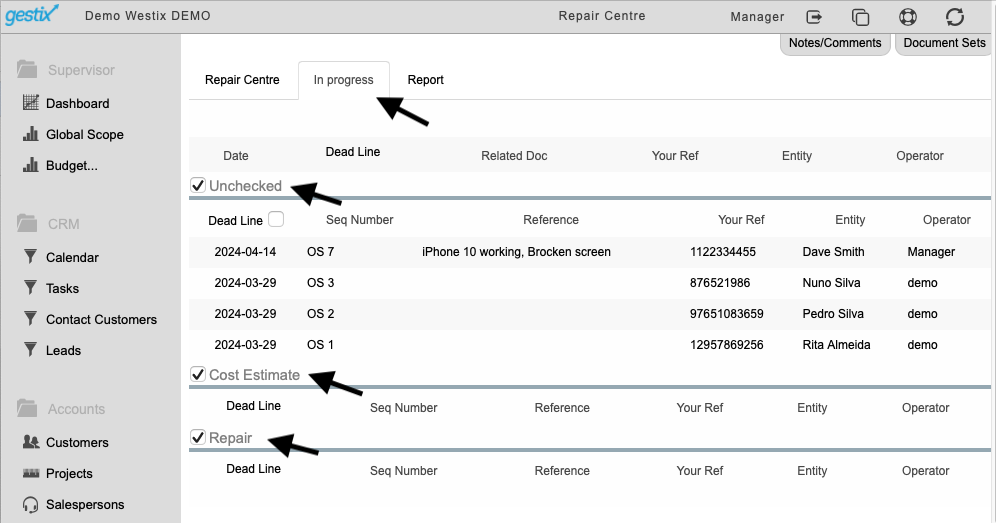
After saving, you will be able to check and trace the repairs you have on the system and the stages they are in.

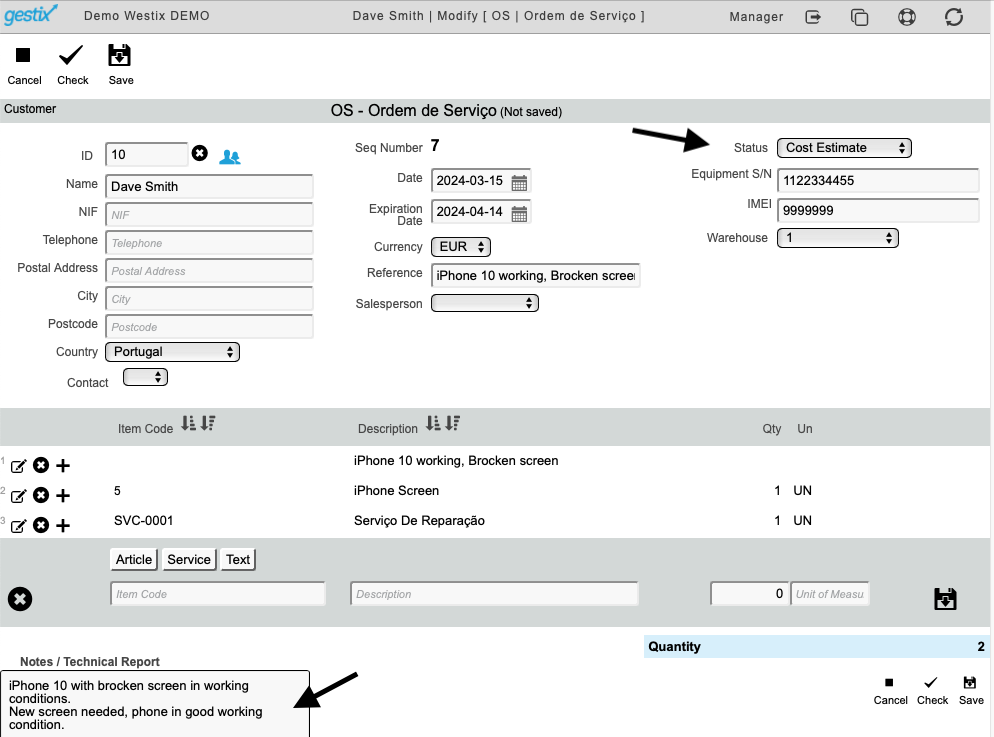
The status of the repair can be updated, for that, go back into the Service Order and change the status situation for the desired one

To finalize the quote, a technical report should be included and save at the end. You can now print or send it directly to the customer.

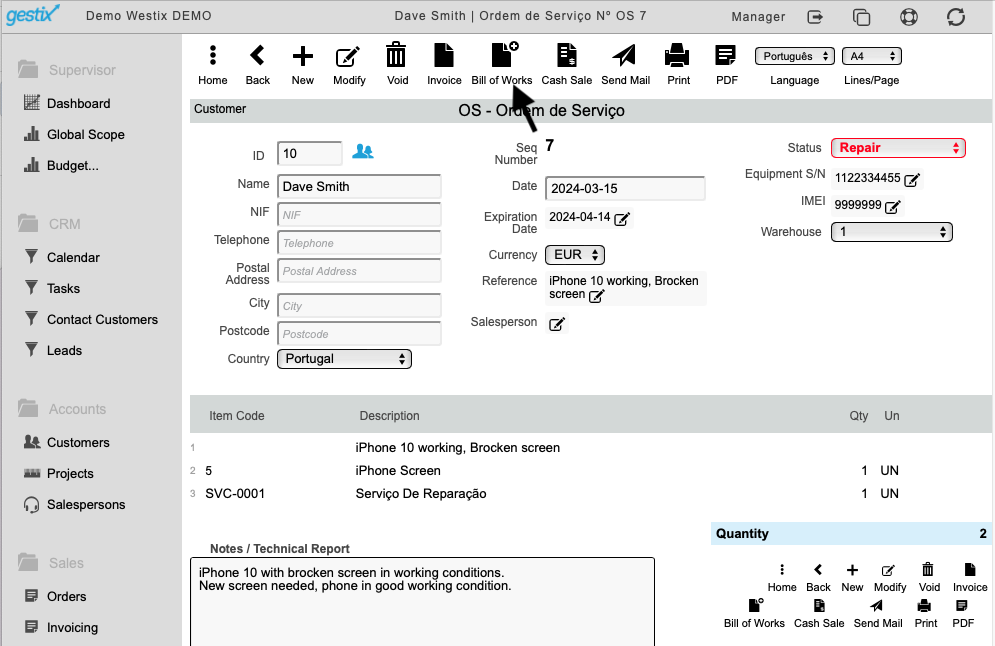
After the quote is approved by the customer, change the status to Repair and save. After saving at the top of the page you will have the option Bill of Materials, click on it

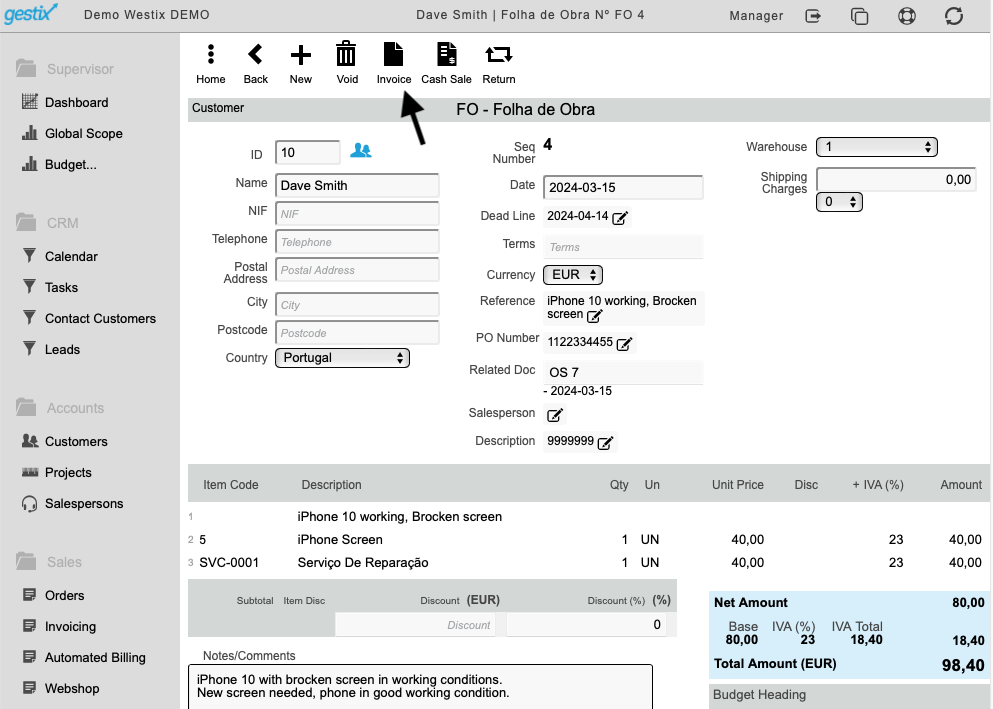
Check if all of the information is correct, add prices of the services provided and materials used. all left to do is to invoice your customer, you can do it by using the option Invoice at the top of the page.

Christmas 2025 and New Year

We took advantage of this period of lower activity (Christmas and New Year) to carry out technical improvements and upgrades to Gestix ERP, with the aim of strengthening the platform’s stability, performance, and reliability, while minimizing the impact on your daily work.

Thank you for your continued trust in Gestix.

We wish you a joyful holiday season and an excellent New Year, filled with success and growth.

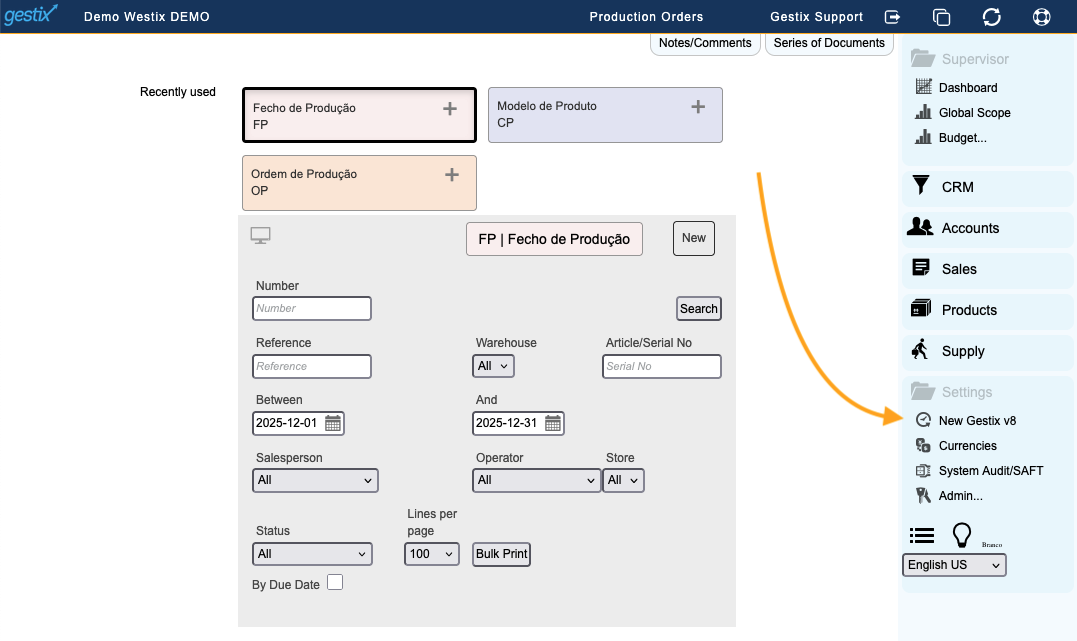
Soon you will find, in your Gestix, the option to try the new Gestix 8 and follow the final phase of its development.

Gestix v8 goes further.

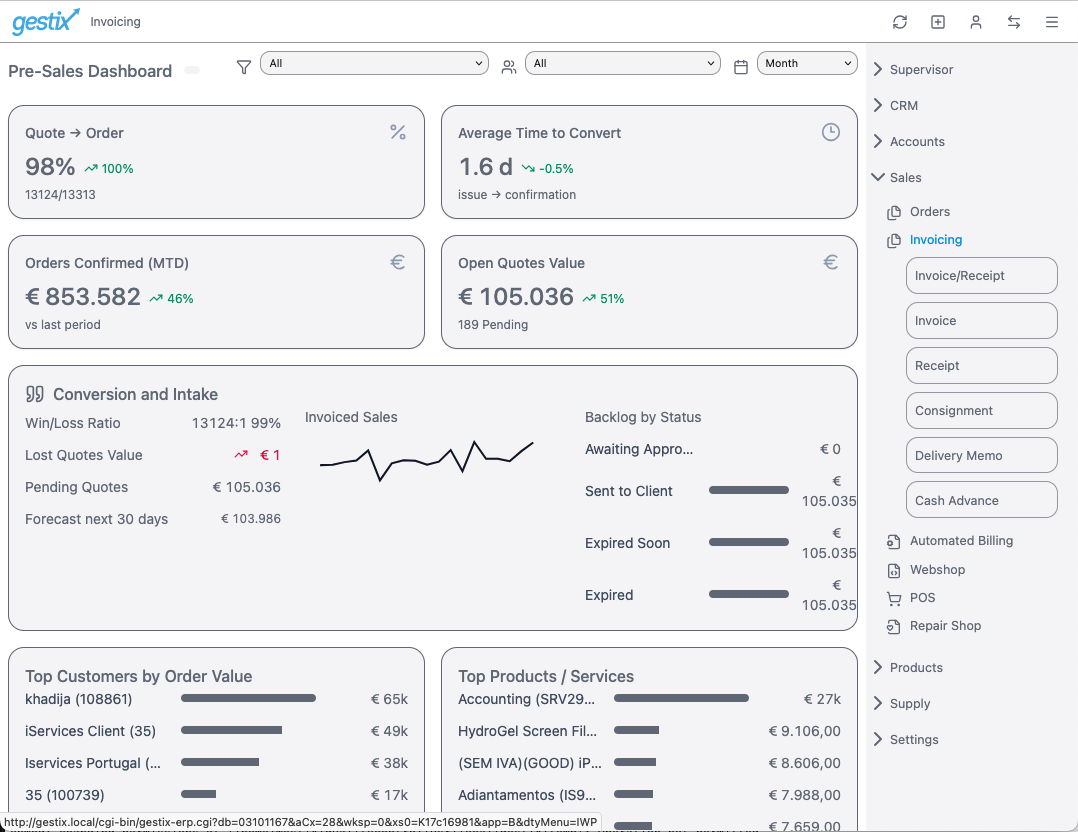
Management. Track the evolution of each area of your business activity, in real time.

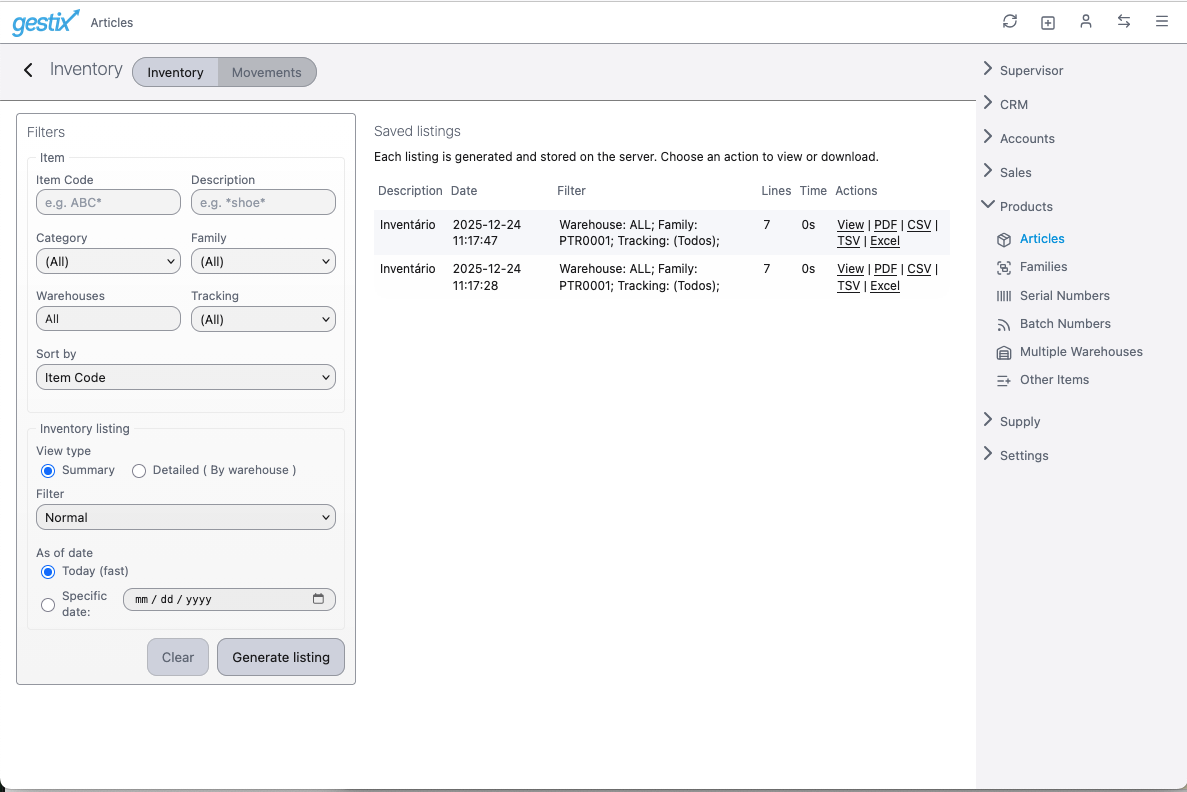
Productivity. The listing or report you select from the Gestix 8 menu is ready in seconds. You can immediately view it, print it, or download it directly to Excel—no more waiting.

Gestix API Documentation

A new Gestix API version has been released.

Gestix API Reference Guide is available from your Gestix Admin | Webshop menu for browsing and for download in PDF format. The API specification in OAS 3.0-style in JSON format is also available for download at this location.
About the vat_included field in the invoice structure:

vat_included

EN

The vat_included field encodes the type of VAT calculation involved in the invoice line, which can assume one of the values 0, 1 and 2, which will be interpreted as follows:
“0” – the price value has been entered without VAT in a Document Set configured as Prices without VAT – this mode is when prices are negotiated without VAT – the invoice will print unit prices without VAT.
“1” – the price value has been entered including VAT in a set of documents configured as Prices without VAT – the software will subtract the VAT from the unit price before recording.
“2” – the price value has been entered with VAT in a Document Set configured as Prices with VAT – this mode is when prices are negotiated with VAT – the invoice will show the unit prices with VAT.

PT

O campo vat_included codifica o tipo de cálculo do IVA envolvido na linha da fatura, podendo assumir um dos valores 0, 1 e 2, que será interpretado da seguinte forma:
“0” – o valor do preço foi inserido sem IVA em um Conjunto de Documentos configurado como Preços sem IVA – este modo é quando os preços são negociados sem impostos – a fatura imprimirá preços unitários sem IVA.
“1” – o valor do preço foi inserido incluindo o IVA em um conjunto de documentos configurado como Preços sem IVA – o software subtrairá o IVA do preço unitário antes da gravação.
“2” – o valor do preço foi inserido com IVA em um Conjunto de Documentos configurado como Preços com IVA incluído – este modo é quando os preços são negociados com IVA – a fatura mostrará os preços unitários com IVA.

Invoice: display the amount in customer’s own currency

In this example, our billing is in EUR (Euros) but want to display the amount in GBP (Great Britain Pounds) in the invoice to certain customers.

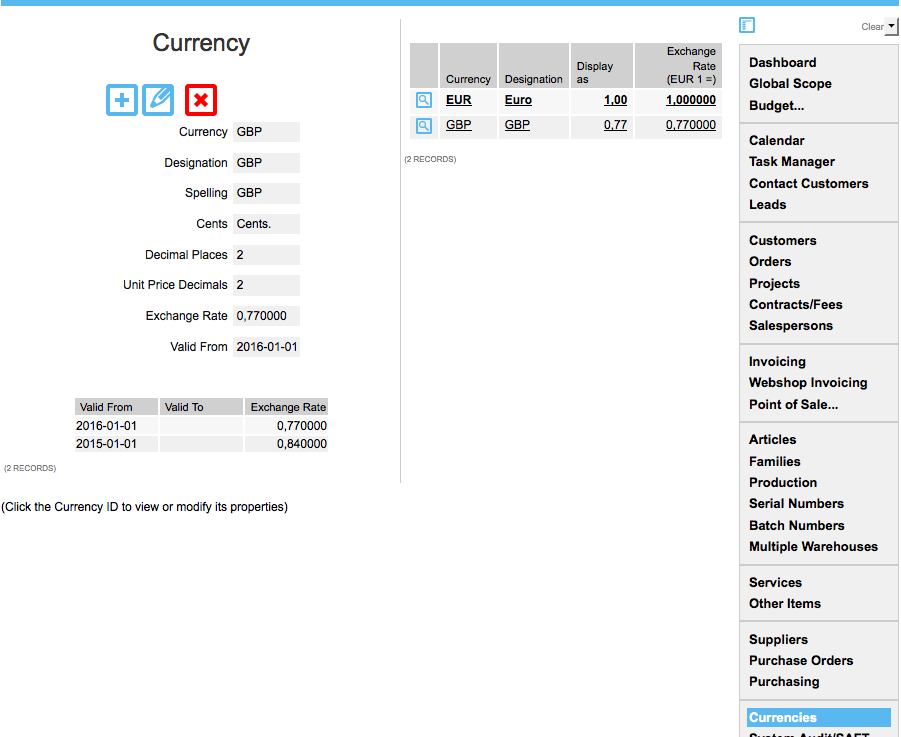
First, add the GBP currency onto the database and specify the exchange rates (Currencies menu).

Currencies menu: Defining currencies and exchange rates

Then, in the Customers menu, edit those customers that want the amount in GBP shown on their invoices.


Customers | Modify Customer - defining customer's preferred currency
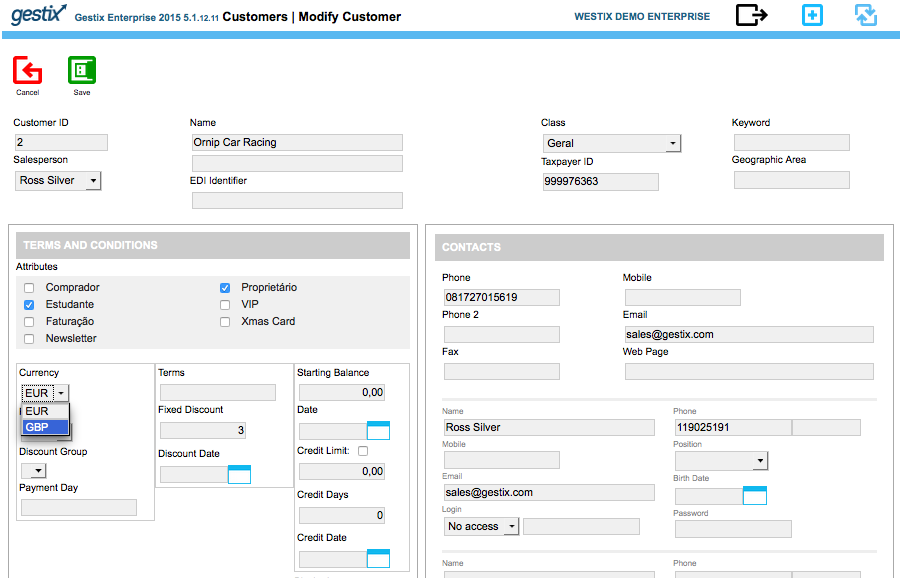
Customers | Modify Customer – defining customer’s preferred currency

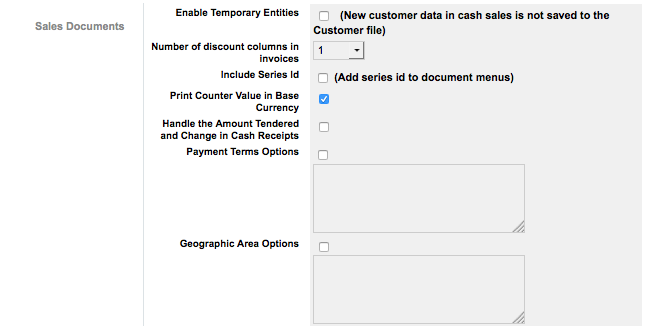
Finally, check the Admin | Settings menu to ensure that the Display Counter Value in Base Currency option is enabled.

Admin / Settings
Admin / Settings

When Display Counter Value in Base Currency is enabled, if the customer’s preferred currency is GBP and the invoice is in EUR (the base currency), the amount in GBP will be printed in the invoice. If the invoice is in GBP, the amount in EUR will be printed instead.

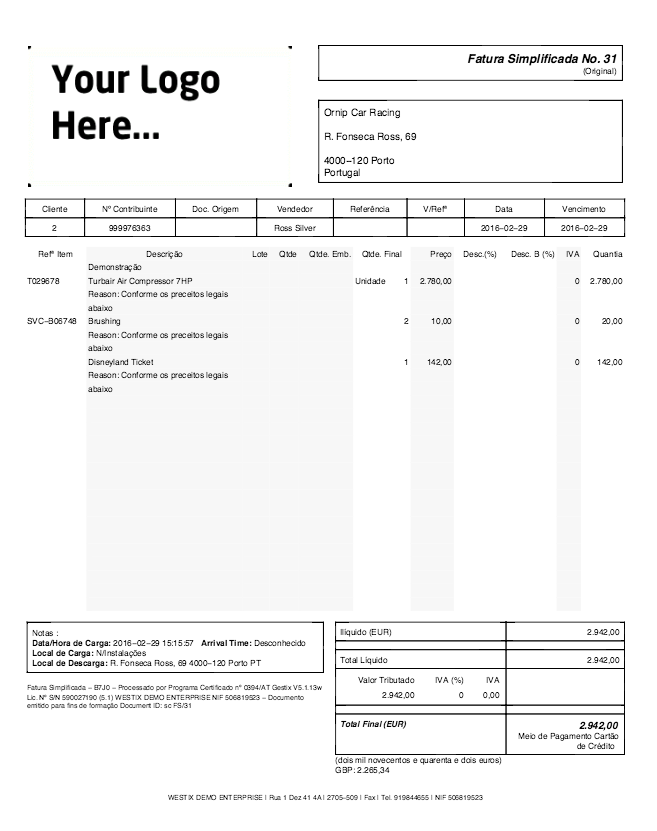
Invoice in base currency (EUR), customer’s preferred currency is GBP

Screen Shot 2016-03-21 at 1.44.01 PM

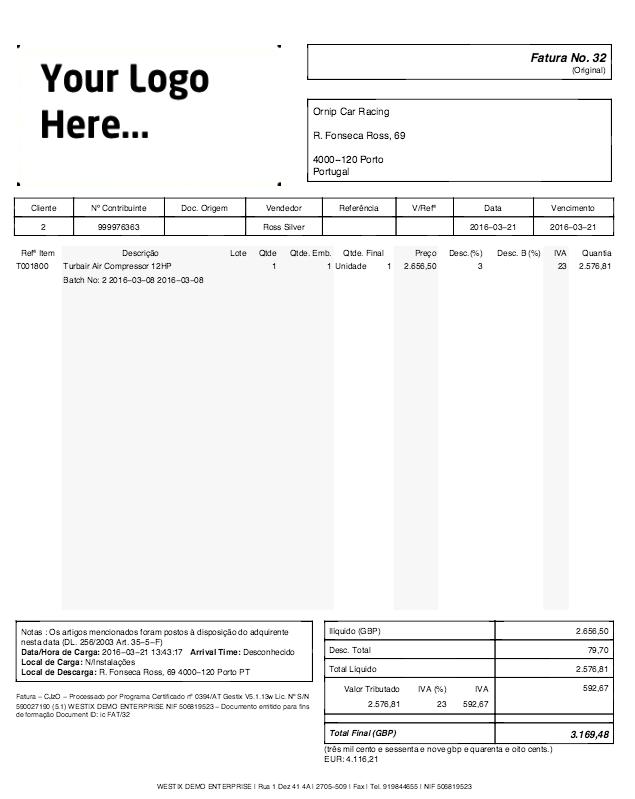
Invoice in GBP, base currency EUR, don’t care customer’s preferred currency

Screen Shot 2016-03-21 at 1.43.43 PM

Any questions or comments? please submit them below.


How to enter a partial payment with Gestix ERP

With the Gestix ERP you can easilly issue a payment receipt for part of an invoice.

Here we go through the steps to process a customer payment, from the Invoicing menu, whereas a similar procedure would be performed for processing payments made to suppliers from the Purchasing menu.

Entering payments and partial payments with Gestix ERP

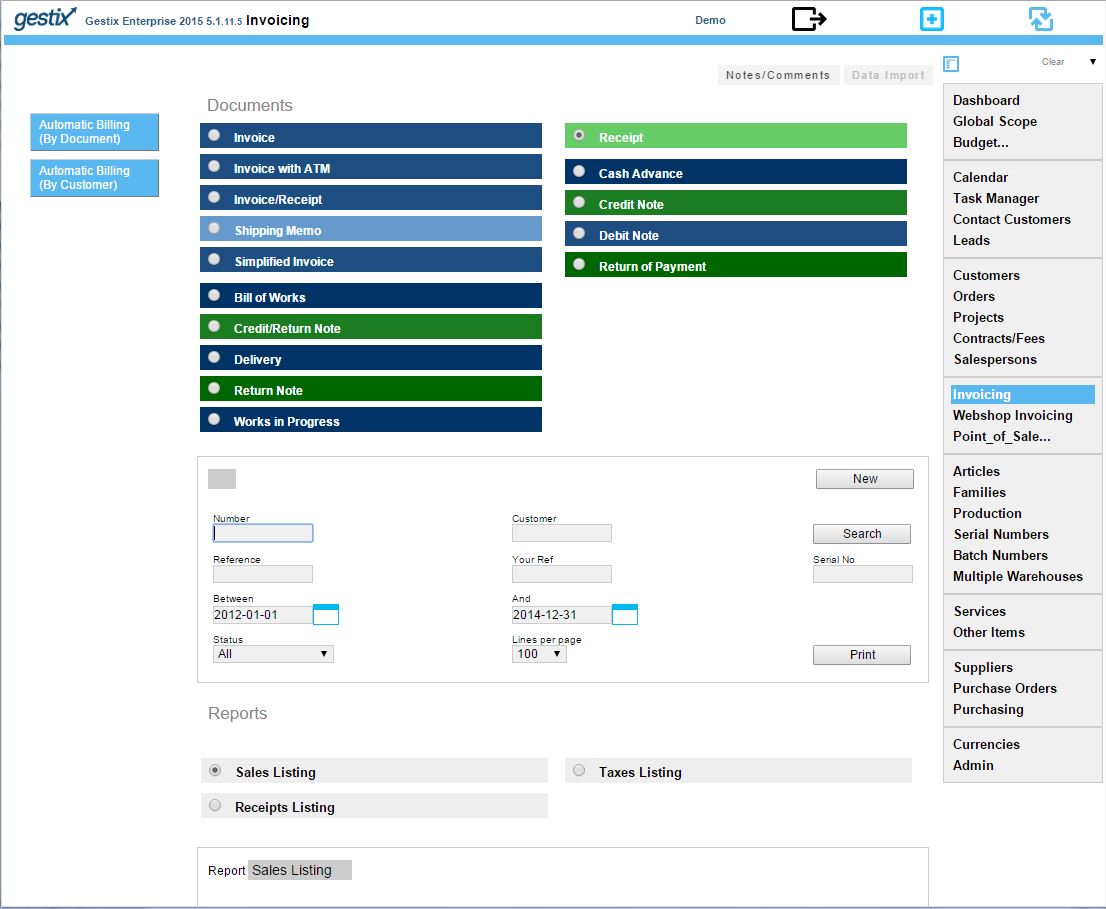
Open the Invoicing menu and click Receipt, New.


partial-payment-gestix-3


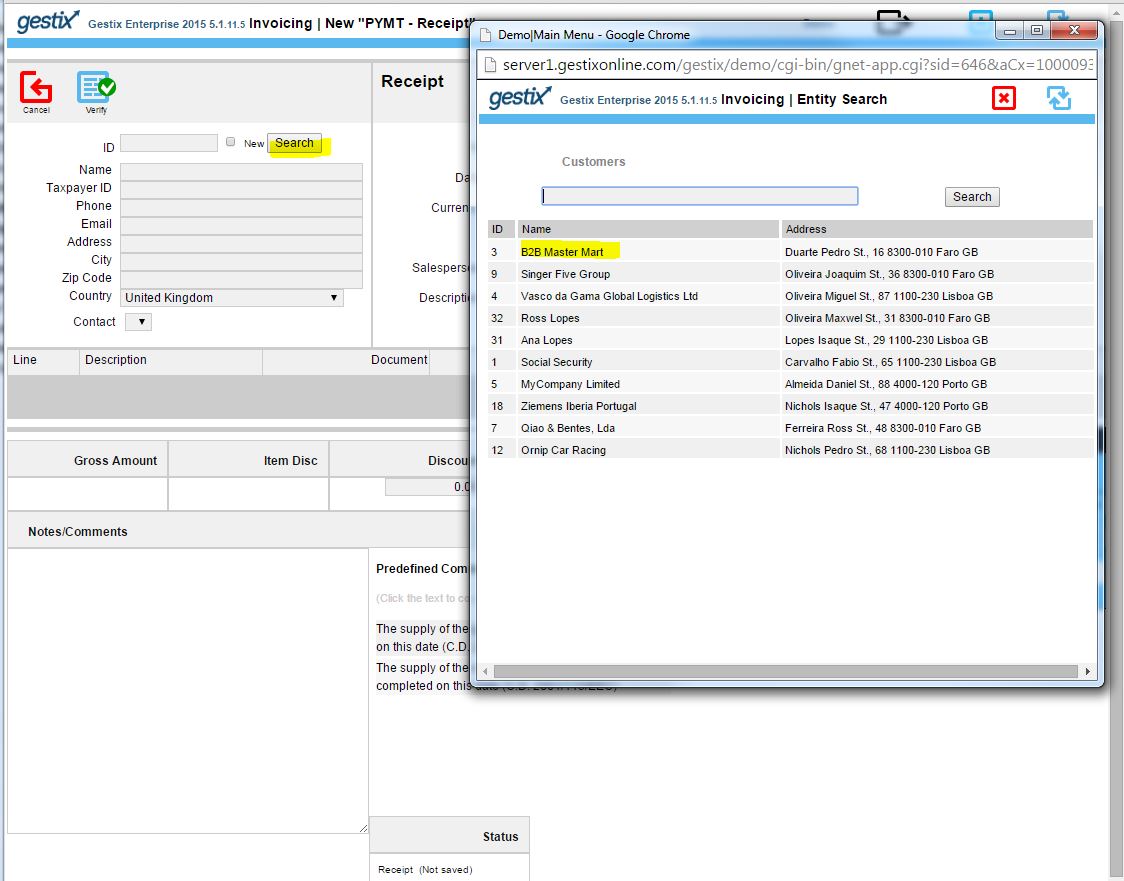
Here we’re clicking the Search button to choose the customer from a pop-up list.


partial-payment-gestix-4

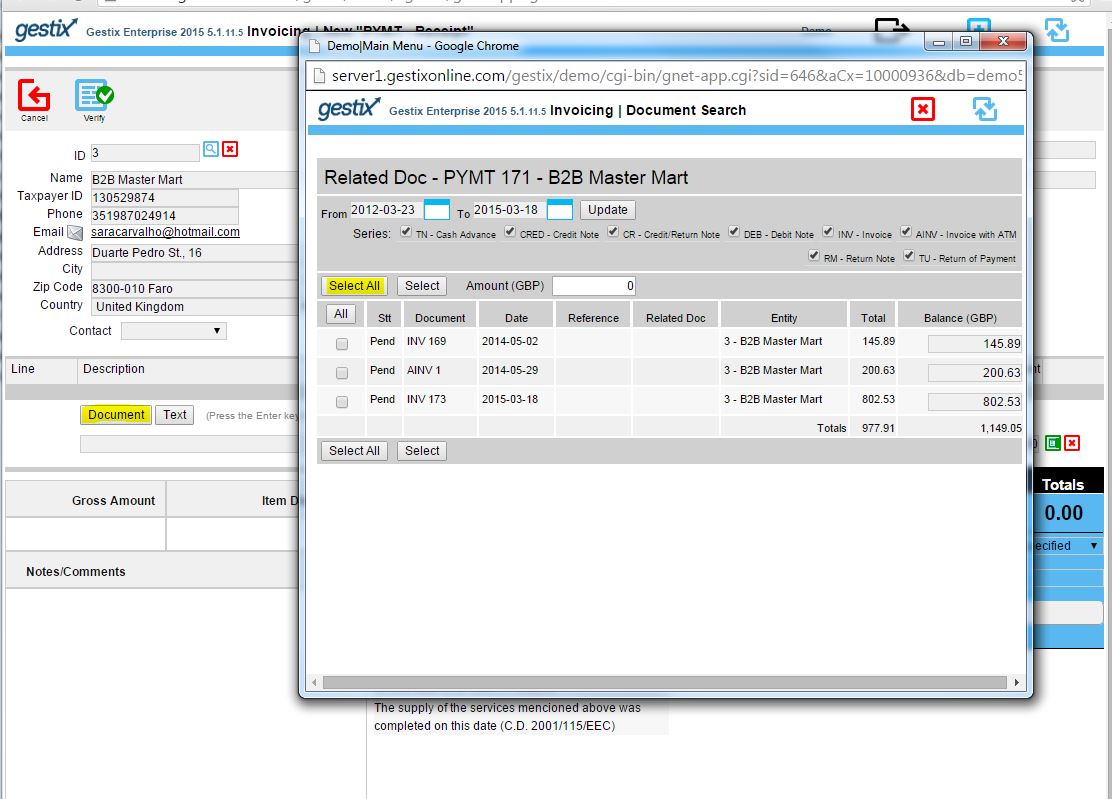
Then we click the button labeled Document to select the invoices being paid, then we click over Select All to add those invoices to the receipt.


partial-payment-gestix-5

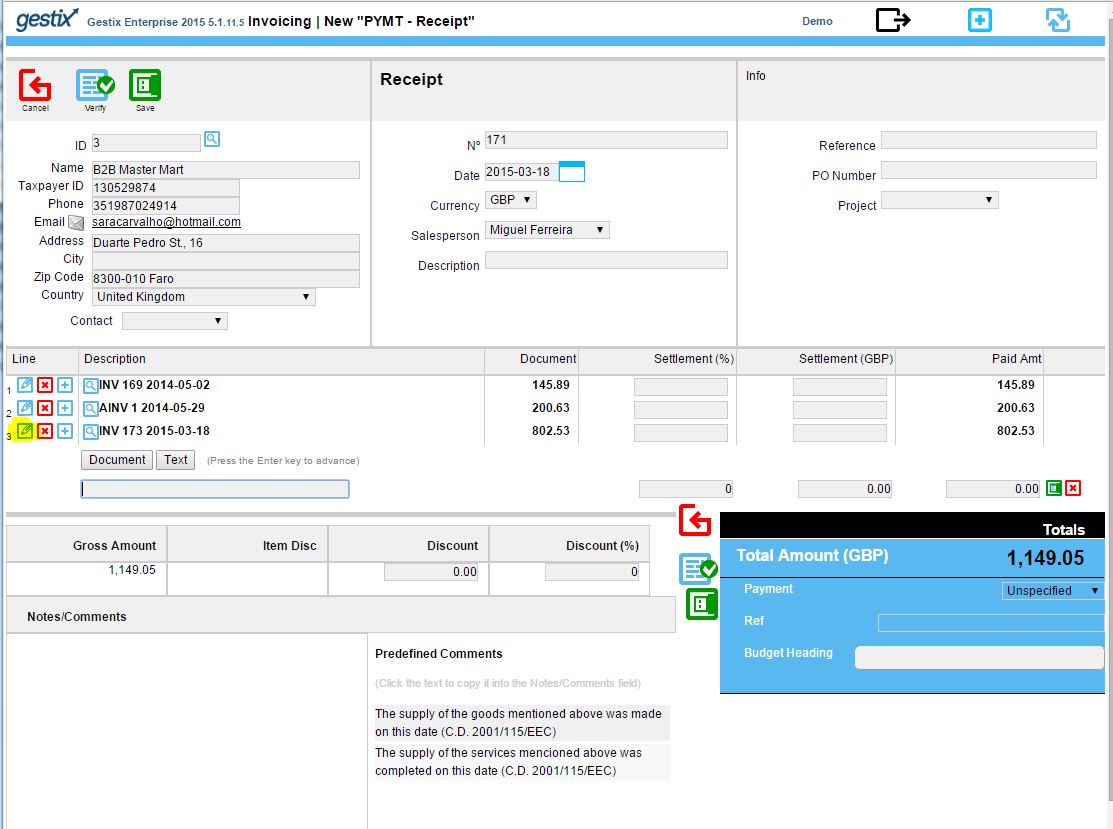
Since the customer is paying the amount of GBP 446,52 and the selected invoices total is greater than this, we want to edit the amount paid for, say, the last of the three invoices. Click the little pencil button labeled Edit at the left hand side of the line.


partial-payment-gestix-6

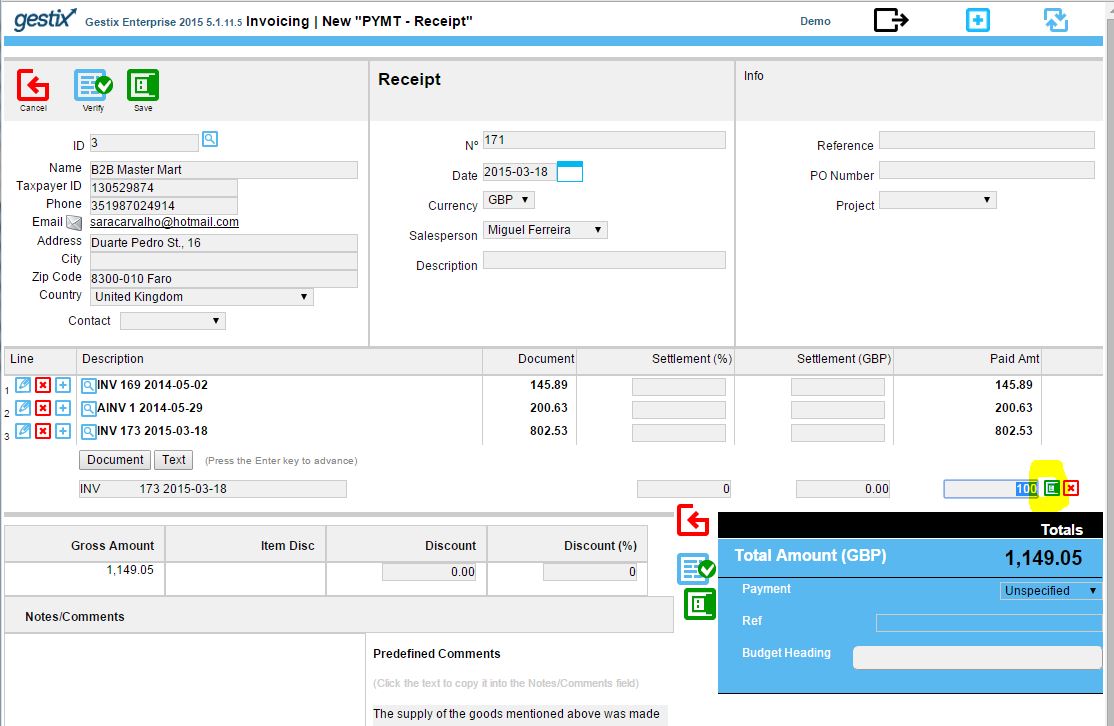
Now let’s enter the correct amount and click the little button labeled Save next to the Paid Amt field.


partial-payment-gestix-7


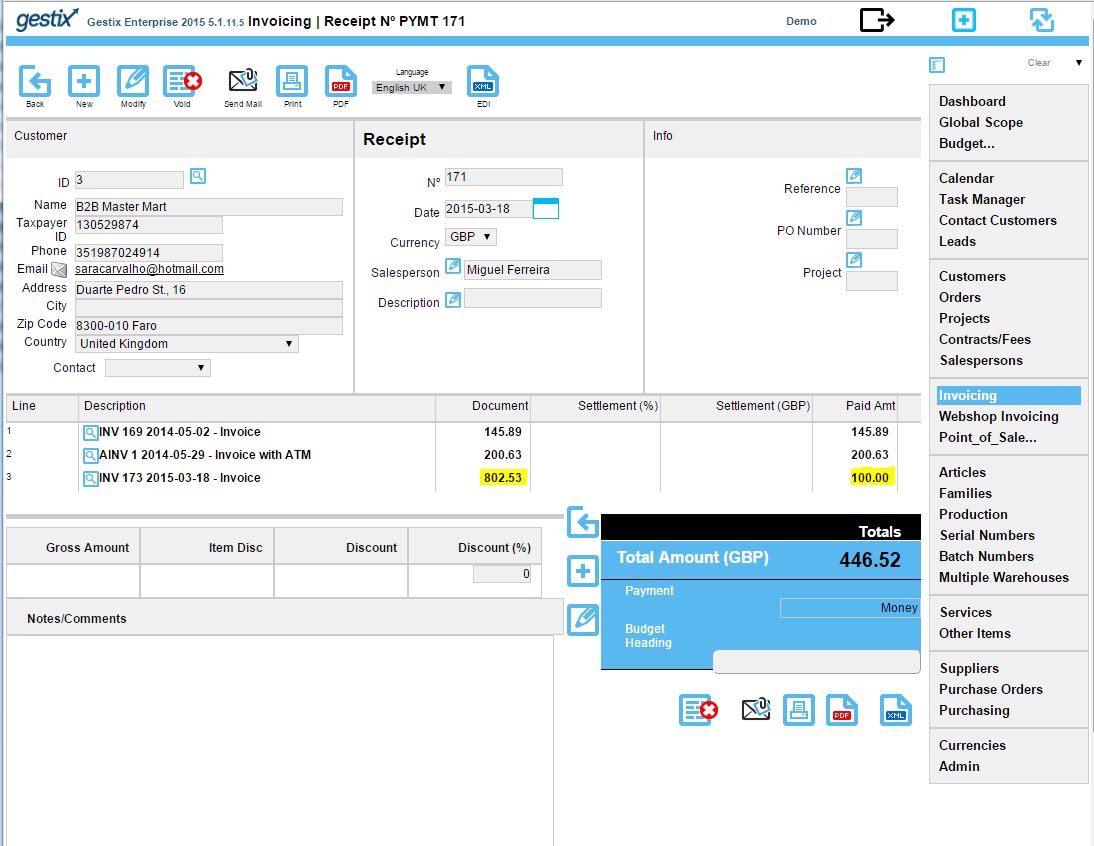
Click the Save button at the top of the document, and it’s ready to print or send by email.

For more information please check the Gestix website at http://gestix.com

How to start MySQL from the Mac OS-X Yosemite Terminal

Symptom: Gestix is working before the computer is shut down however. Once the computer is restarted, Gestix stops with the following message.

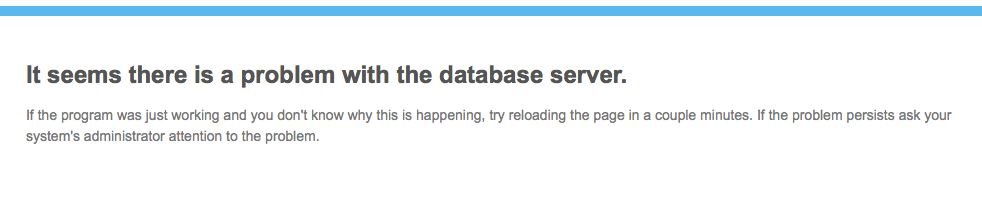
Gestix complains about the database system

(It seems there is a problem with the database server. 
If the program was just working and you don’t know why this is happening, try reloading the page in a couple minutes. If the problem persists ask your system’s administrator attention to the problem.)

Although the MySQL Startup item seems to no longer work on OS-X 10.10, it’s possible to start it from the command line.

1. Open Finder | Applications | Utilities | Terminal

2. Paste this command and press Enter

sudo /usr/local/mysql/support-files/mysql.server start

3. Close the Terminal application.

If the problem persists there may be need for a remote technical intervention to the server by MySQL system specialists. Order technical support here.